Support article for Lexmark CX921
202.93 paper jam and print quality issue from unremoved packaging material
Issue Description:
This is an Out of the Box (OOB) issue since it is induced during the installation of the Lexmark device.
It has been observed that there are reports of error messages and print quality defects after the setup and installation of these devices, specifically when packaging shipping clips are not removed from the transfer roller.
Solution:
Check the Lexmark device for any packaging material that was missed.
Remove the packaging materials located in the Second Transfer Roller.
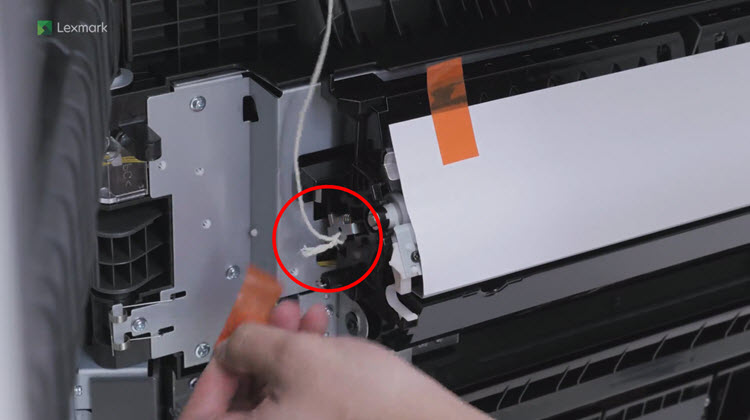
NOTE:
There are two packaging shipping clips that are found in the Second Transfer Roller.

Additional Resources:
Please check the following resources for additional instructions and other commonly missed packaging material, when setting up the printer and removing the packaging materials:
Related Articles:
- Common Issues Related to Setup and Installation - Common Issues Related to Setup and Installation on the Lexmark CS92x and CX92x
How-To Videos
Setup Sheets
- Installing the Staple Finisher
- Installing the Staple Hole Punch Finisher
- Installing the Hole Punch Booklet Finisher
LEGACY ID: SO8674
Rate this article
We appreciate your feedback. We use it to identify content which needs to be updated for accuracy or usefulness.
Thank you for your feedback!