Artículo de asistencia para Lexmark X864
How to Enable Fax Support on MFPs which Incorporate the PKI(CAC) Solution
What you will see
Fax functionality is not allowed on any PKI(CAC*) equipped-MFP.
* Common access card
Suggested Remedy
Activate Fax functionality utilizing the four steps below.
This procedure and accompanying screen shots applies to the following:
- - X46x Series MFPs
- - X65x Series MFPs
- - X73x Series MFPs
- - X86x Series MFPs
* x denotes any number within a given product model series.
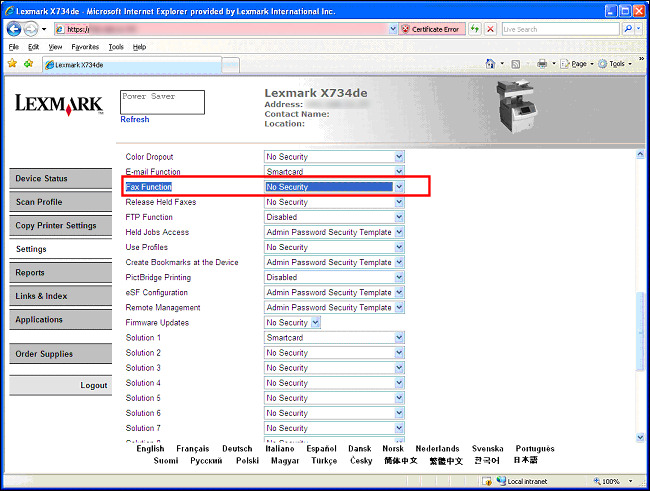
Step 1: Enable Fax Function Access(controls) on CAC-equipped Lexmark MFP
Open the MFP's webpage. e.g., https://ipaddressofmfp.
Select
Settings
.Select Security.
Select
Security Setup
and enter Username and password if prompted.Select Access Controls.
Next to Fax Function, click the drop-down arrow to select the appropriate security template name to provide access to users.
Click Submit.

Click here
Step 2: Verify 'Fax Setup' Settings
Open the MFP's webpage. e.g., https://ipaddressofmfp.
Select Settings.
Select Fax Settings.
Select Analog Fax Setup.
Enter a Station Name and Number if necessary.
Make sure “Enable Fax Receive” has a checkmark.
Click Submit.
Click here
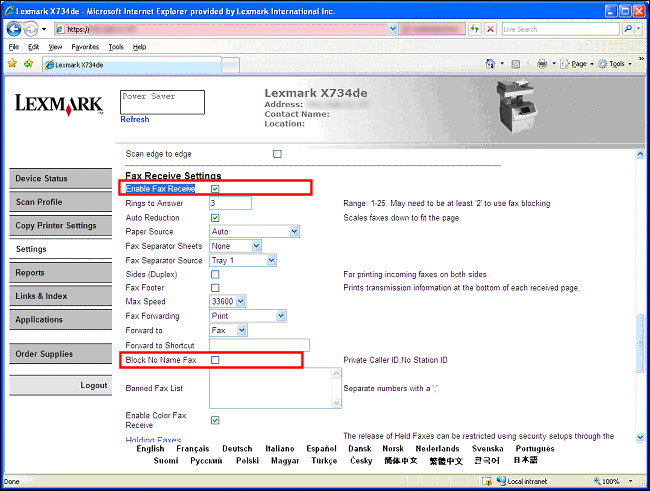
Important! Make sure that "Block No Name Fax" is not selected if you want to receive all incoming faxes.
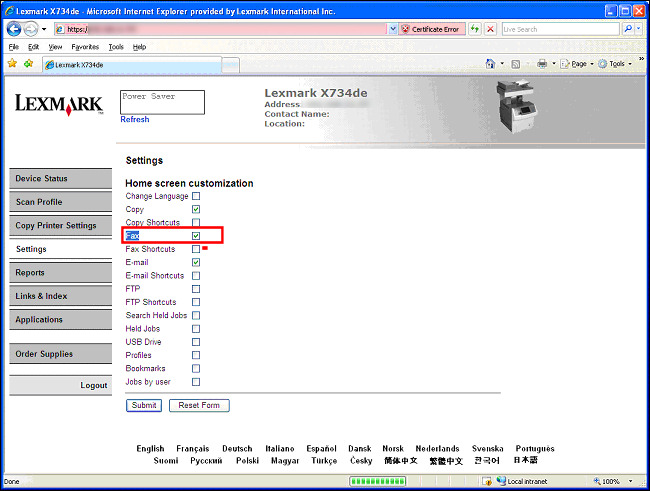
Step 3: Edit Home Screen Customization to Enable Fax Function Icon
Open the MFP's webpage. e.g., https://ipaddressofmfp.
Select Settings.
Select General Setup.
Select Home Screen Customization.
Check the Fax box
Click Submit.
Click here
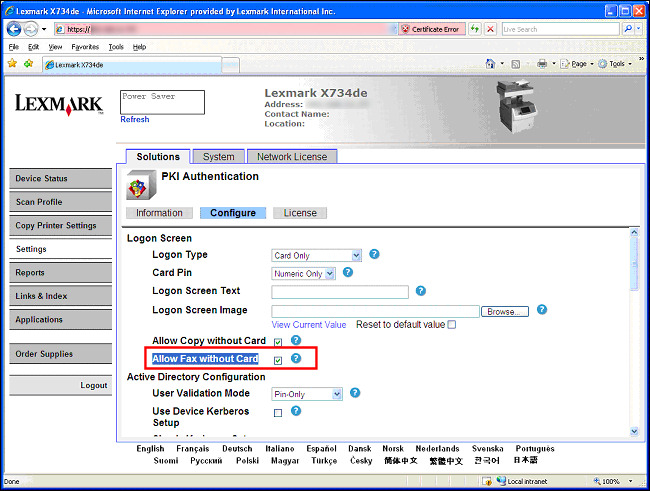
Step 4: Allow Fax Access without Card Access
Open the MFP's webpage. e.g., https://ipaddressofmfp if you have already closed out of the web browser.
Select Settings.
Select the Emedded Solution "PKI Authentication".
Select the Configure tab.
Check “Allow Fax without Card”.
Click Apply.
Click here
Still Need Help?
If you need additional assistance, please see
Please call from near the computer and printer in case the technician on the phone asks you to perform a task involving one of these devices.
LEGACY ID: SO5717
Calificar este artículo
Agradecemos sus opiniones. Las utilizamos para identificar el contenido que debe actualizarse para mejorar su precisión o utilidad.
¡Gracias por su colaboración!