Support article for Lexmark XC4140
E-mail transmission error codes and recommendations
Issue description
An E-mail Transmission Failure message is displayed on the printer control panel, followed by a printed Scan Log.
This article shares some of the possible causes for the error codes depicted on the Scan Log.
Note: Not all Lexmark multi-function printers support email authentication. If your printer does not, contact your E-mail Service Provider (ESP) to see other available options. You may have to perform a scan-to-pc if so.
Common "Scan Log" error codes
| Error code | Possible incorrect email configuration settings | Recommendations |
|---|---|---|
Connection Failure: <-7> Connection Error | Incorrect Port | Enter a different port number and test again. Common ports include 465, 587 and 25. |
Connection Failure: <-10> E-mail Server Not Set up. |
 |
|
Connection Failure: <-11> Cannot resolve server address. |
|
|
Connection Failure: <-19> | Incorrect Port or SSL/TLS setting | Contact your ESP and verify SSL/TLS and Port combination, and test again. |
Connection Failure: <-22> SSL certificate validity has a future date. | The configured Date and Time are inaccurate. | Update and set the correct date and time on the device. In the control panel, go to Settings > Device > Preferences > Date and Time > Configure. |
Connection Failure: <-52> Error sending to an email connection failure -52 self time certificate. | Validate CA has been checked. | Uncheck the "Validate CA" tickbox. Access printer EWS > go to Settings > E-mail/FTP Settings > E-mail Settings > Setup E-mail Server > clear Validate CA |
Connection Failure <504> | SMTP Server Authentication set to "NTLM" | Unrecognized Authentication Type. Change Authentication to applicable Plain/Login or None. |
Connection Failure: <530> |
|
|
Authorization failed <534> | N.A. | Enable your Gmail account access for less secure apps. To do so:
|
Connection Failure <535> | Username and Password not accepted. | Change username and Password and test again. Again, some ESPs require full email address (hello@yahoo.com) and others require only the beginning Userid (hello) portion of the email address. Passwords are sensitive to spelling, capitalization, and the use of symbols and characters. |


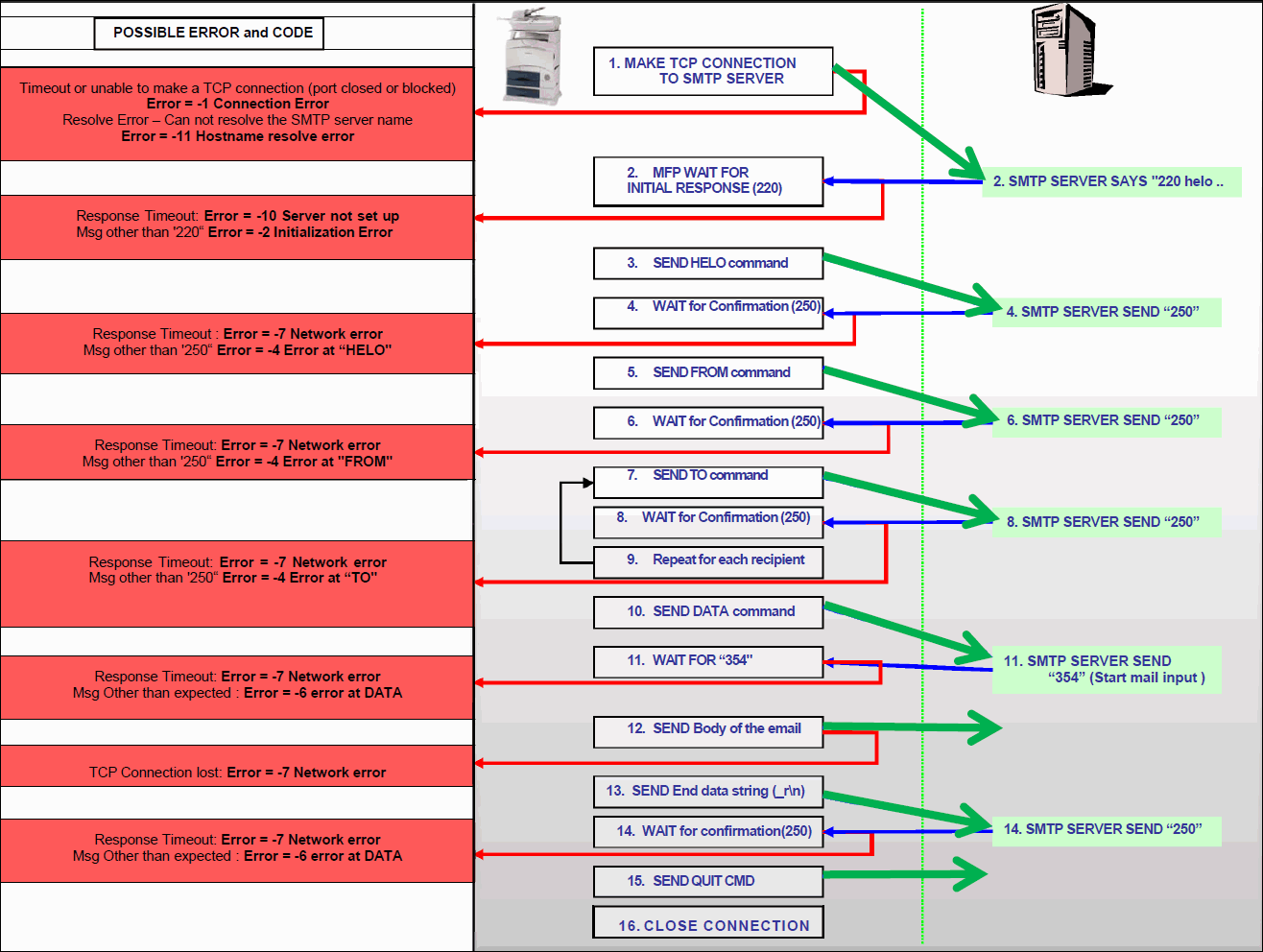
Printer to email server communication flow and email error triggers
The printer initiates communication (Step 1) and closes the connection (Step 16).
Related articles
See this article to find out more about the E-mail Setup Wizard "Incomplete E-mail Configuration" message as seen with inkjet printers.
LEGACY ID: SO6867
Rate this article
We appreciate your feedback. We use it to identify content which needs to be updated for accuracy or usefulness.
Thank you for your feedback!