Support article for Lexmark X925
Waste Toner Bottle Missing on a Lexmark C925/X925 Printer MFP
 Overview
This article outlines the steps to address the 82 Waste Toner Bottle Missing error on a Lexmark C925/X925 Printer MFP.
Troubleshooting
| Step | Action | Yes | No |
| 1 | If this is the first time the message appears, power off the printer. Wait ten seconds and power it back on. Did this clear the error? | Issue is resolved. | See Step 2. |
| 2 | Power off the printer then remove and reinstall the waste toner bottle. See the steps below and the corresponding images on the right to locate and remove the waste toner bottle. A. Open the front door (1) and lower the inner photoconductor locking door(2) , 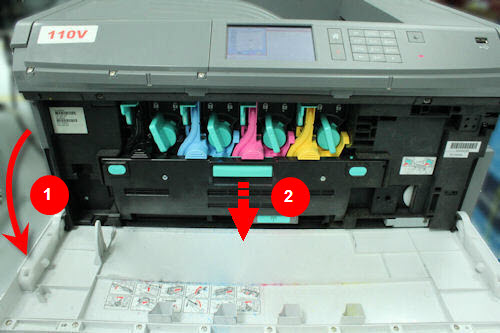 B. Pull the toner bottle out and push it back in. 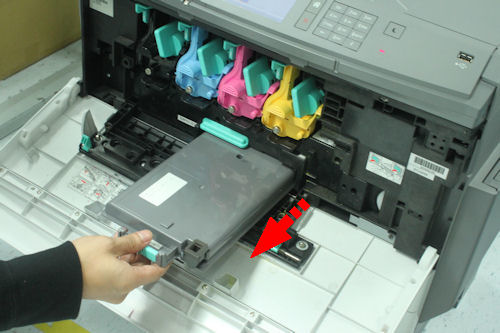 Did this clear the error? | Issue is resolved.. The error can occur if the toner bottle is not properly inserted. | Contact Lexmark Technical Support for other troubleshooting suggestions. |
Contacting Lexmark
If you need additional assistance, please go to the Lexmark support site, type your printer model and locate Get in Touch with Lexmark! for contact information.
NOTE: When calling for support, you will need the following:
- Printer model
- Printer serial number
- Toner/imaging unit/waste toner bottle part number and serial number (for supply-related issues)
Please be near the product/s described in this article to expedite the support process and reduce callbacks.
LEGACY ID: SO6310
Rate this article
We appreciate your feedback. We use it to identify content which needs to be updated for accuracy or usefulness.
Thank you for your feedback!