Support article for Lexmark X738DE
843.xx scanner failure
Issue description
The Auto Document Feeder (ADF) is the top portion of the scanner where you can place a stack of documents to be scanned or copied. You may get any of the following error messages when it fails to pull paper to be scanned: 843.03, 843.04, 270.02, 290.01 or 290.02, 291.01, or ADFfails to pick.
Solution
Confirm that you are scanning a material printed on a plain copy paper.
- Please try this even if the print media you are using worked in the past. This eliminates the scanned media as partial cause of the issue. The scanner's Paper Pick Rollers may experience difficulties in pulling specialty papers (for example, glossy, letterhead stock, transparencies and label stock) can lead to paper-feed issues such as this.
Note: For more information on recommended print media, see the chapter entitled 'Understanding paper and specialty media guidelines' in the printer's
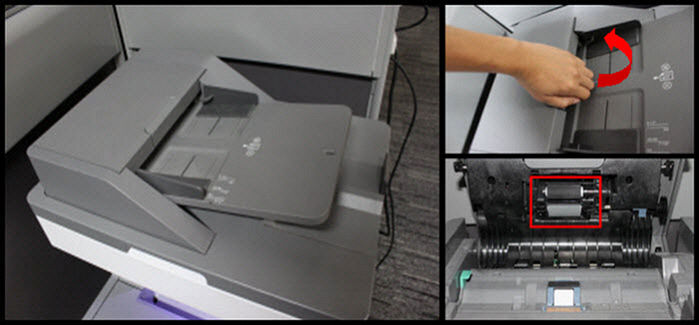
User's Guide .Verify whether the Paper pick rollers of the ADF are in good condition and try to clean them. See the right-hand image for the complete diagram on how to access the ADF pick rollers. Use a lint-free cloth and isopropyl alcohol to clean the tires.
- If the pick tires are worn out, please contact Lexmark Technical Support to order a new set or have them replaced if the printer is still in warranty.
- If the pick tires are in good condition, proceed with the next step before contacting Lexmark Technical Support for other troubleshooting suggestions.
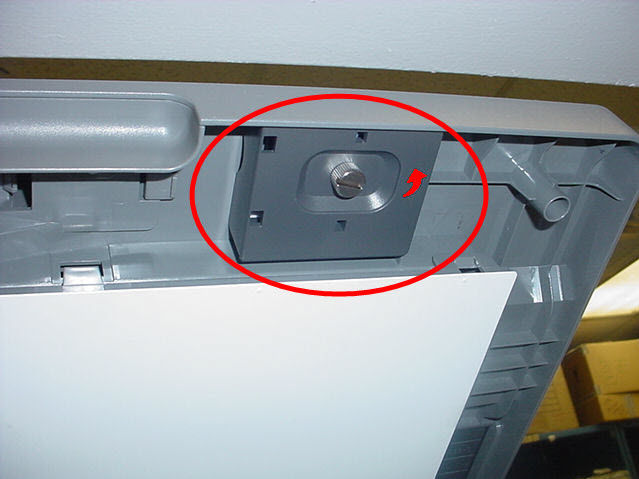
Replace the ADF Separator Pad using the spare that came with the printer. To access the spare parts, remove the slotted screw as shown in the right-hand image.
Note: If you are not comfortable in doing the replacement of the part, contact Lexmark Technical Support for guided help or to set up printer service.

LEGACY ID: TE318
Rate this article
We appreciate your feedback. We use it to identify content which needs to be updated for accuracy or usefulness.
Thank you for your feedback!