Support article for Lexmark X736DE
How to Locate the Serial Number, TLI, Config ID, and Machine Type on the Lexmark C734, C736 or X734, X736, X738 Color Laser Printers
Purpose
This article explains how to find information such as the serial number, top-level indicator (TLI), machine type, and configuration ID on the printer.
What to do
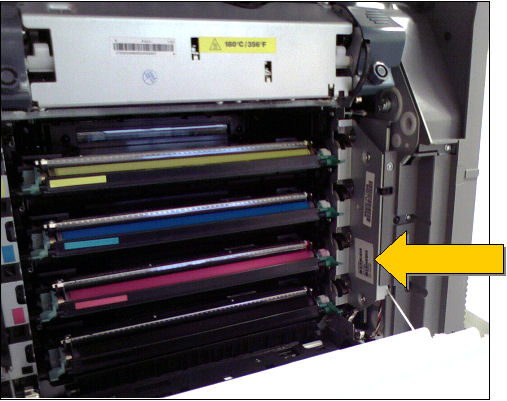
Open the printer's front cover. Refer to the yellow arrow to find where the above-mentioned information is located.
LEGACY ID: SO4862
Rate this article
We appreciate your feedback. We use it to identify content which needs to be updated for accuracy or usefulness.
Thank you for your feedback!