Support article for Lexmark X651DE
Fax error codes and recommendations
Overview
A fax error code may provide the necessary information to resolve a fax issue.
Where to begin
Obtain the Transmission Log and the Fax Call Log, which will often display an additional fax error code that identifies the reason for a failed fax.
See this article for information on how to view or print the fax call log, or see this article for information on how to enable fax logs.
Note: Many of these errors are associated with poor phone line conditions. Attenuation (signal loss) or excessive noise (interference) in the phone line are primary culprits for fax failures.
Before you contact technical support, it is recommended that you contact your phone service provider to have the phone line tested. If available, connect a standard phone to the same fax line and perform your own preliminary quality test.
Print your fax settings via Menus > Reports > Menu Settings Page.
Note: You may also view these settings from your printer's Embedded Web Server (EWS) under Reports > Device Settings > Analog Fax Settings. See this article to view steps to access printer's EWS.
Further identify the fax problem.
Fax behavior observations Then... And... Complete failure to send or receive faxes See this article for general fax troubleshooting suggestions related to fax setup and phone line quality or phone line conditions... Use your printed menus setting page and the MFP's User's Guide for additional suggestions. No fax reception issues, but fax-send failures See this article for preliminary diagnosis.
Identify the fax error code.

Select your fax error code from the list below and follow the suggestions in the Error code suggestion chart. No fax send issues, but fax-reception failures See this article for preliminary diagnosis.
Identify the fax error code.
Select your fax error code from the list below and follow the suggestions in the Error code suggestion chart.
How to use this document
Select the fax error code or code range below.
Perform any resolution suggestions.
If unable to find a resolution, contact Lexmark Technical Support.
Fax error codes
Select the error code as seen on your Transmission log or Fax Call Log.
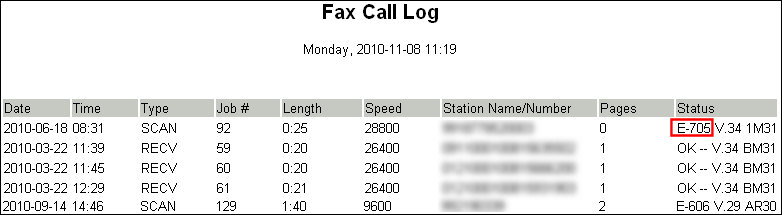
Note: An XX is any number within an error code range; e.g., E-713.
Help articles referenced in the chart
| Fax Setting | Article |
|---|---|
| Max Speed adjustments | |
| Modulation Settings | Contact Lexmark Technical Support |
| Rings To Answer | See User's Guide, or perform the following:
|
| Redial Attempts | |
| Memory Use | |
| Behind a PABX | |
| Enable Auto Convert Color Faxes to Mono Faxes | |
| Resolution Adjustment | See the User's Guide, or change this setting from the control panel before initiating the fax. |
Notes:
- View the IP address on the printer control panel in the TCP/IP section under the Networks/Ports menu, or print a Network Setup page to locate the IP address under the TCP/IP heading.
- *You may not have a choice to reduce this number because of extension phones or other devices on the same line as the printer. In this case, temporarily disconnect these devices and test again.
"Fax Error" code suggestion chart
| Error code | Error code definition | Suggestions |
|---|---|---|
| E-000 | No error occurred during fax transmission. | Not applicable |
| 200 Related Errors | ||
| E-200 | Error occurred when transmitting training. |
|
| 300 Related Errors | ||
| E-3XX | Error occurred when receiving image data. |
Note: Max Speed adjustment instructions for Receive and Send are identical; however, these settings are found in two different locations. |
| 400 Related Errors | ||
| E-4XX | Error occurred when sending image data. |
|
| 500 Related Errors | ||
| E-5XX | Received unknown response from remote fax device. | Contact Lexmark Technical Support for suggestions if this message inhibits successful fax transmission. |
| 600 Related Errors | ||
| 6XX | Error occurred when receiving a frame. | Check line quality. |
| 700 Related Errors | ||
| 7XX | Error occurred when sending a frame. |
|
| 800 - 80E Related Errors | ||
| 800 | Received EOT unexpectedly from the modem in V34 mode. |
|
| 802 | Too many timeouts occurred during ECM reception. | Contact Lexmark Technical Support. |
| 803 | Fax was canceled by user. | Not applicable |
| 804 | Unexpectedly received disconnect command from remote end. |
|
| 805 | Remote fax device failed to respond to the DCS command. |
|
| 808 | T1 Timeout occurred when trying to establish a connection with remote fax device. | Contact Lexmark Technical Support for assistance. |
| 809 | T2 Timeout occurred due to loss of command/response synchronization. | Contact Lexmark Technical Support for assistance. |
| 80A | T5 Timeout occurred when transmitting image data to remote fax device. |
|
| 80B | Too many errors when transmitting image in ECM mode. |
|
| 80C | Remote device failed to respond to the ‘CTC’ command. |
|
| 80D | Received too many requests from remote end to repeat the previous command sent. |
|
| 80E | Functional limitation – Remote fax device does not support G3 receive capability. | Not applicable |
811 - 88A Related Errors continued... | ||
| 811 | Failed to detect a fax device at the remote end. |
|
| 812 | No more data rates available in V34 modulation scheme. |
|
| 813 | Timeout occurred after waiting too long to receive a good frame. | Contact Lexmark Technical Support for assistance. |
| 814 | Tried too many times at selected speed using V34 modulation scheme. |
|
| 815 | Fax transmission was interrupted due to power failure. |
|
| 818 | Fax transmission failed due to insufficient memory to store scanned image. |
|
| 819 | Fax transmission failed due to insufficient memory to store received image. |
|
| 81A | A timeout occurred during transmission of a page in ECM mode. |
|
| 81B | Line too long | Rescan and transmit again. |
| 880 | Failure to transmit training successfully in V17, V29, V27ter modulation schemes. |
|
| 881 | Failure to transmit training successfully in V33, V29, V27ter modulation schemes. |
|
| 882 | Failure to transmit training successfully in V17, V29 modulation schemes. |
|
| 883 | Failure to transmit training successfully in V17, V27ter modulation schemes. |
|
| 884 | Failure to transmit training successfully in V29, V27ter modulation schemes. |
|
| 885 | Failure to transmit training successfully in V17 modulation scheme. |
|
| 886 | Failure to transmit training successfully in V29 modulation scheme. |
|
| 887 | Failure to transmit training successfully in V27 modulation scheme. |
|
| 888 | Failure to transmit training successfully at 2400 bps in V27 modulation scheme. |
|
| 889 | Failed to connect at minimum speed supported by MFP. |
|
| 88A | Failed to connect using V34 modulation scheme. |
|
| 900 Related Errors | ||
| 901 | No fax tones detected from remote end. |
|
| 902 | No dial tone detected. |
|
| 903 | Busy tone detected. |
|
| 904 | Hardware error detected. | Check/replace MFP hardware if error persists. |
| 905 | A timeout occurred after dialing number and waiting for response. |
|
| 906 | Fax send was cancelled by user. | Not applicable |
| 907 | Modem detected a digital line connection. | Verify MFP is connected to an analog phone line. |
| 908 | Phone line was disconnected. | Restore phone line connection. |
| A0 Related Errors | ||
| A00 | Received request for unsupported function from remote fax device. | Not applicable |
| A01 | Received request for unsupported image width from remote fax device. | Select a smaller page width. |
| A02 | Received request for unsupported image resolution from remote fax device. | Select a lower resolution. |
| A03 | Received request for unsupported compression type from remote fax device. | Send – Enable Auto Convert Color Faxes to Mono Faxes. Receive – Enable Color Fax Receive. |
| A04 | Received request for unsupported image length from remote fax device. | Select a shorter page size. |
| F00 | Unknown error occurred. | Not applicable |
LEGACY ID: SO6393
Rate this article
We appreciate your feedback. We use it to identify content which needs to be updated for accuracy or usefulness.
Thank you for your feedback!