Support article for Lexmark X651DE
Faxless X651e and Related Products: How to Remove the Red Flashing LED and Exclamation Point over Fax Icon
Purpose
This article provides information on how to correct a fax setting that causes the red LED to flash and the fax function to be disabled.
What you will see
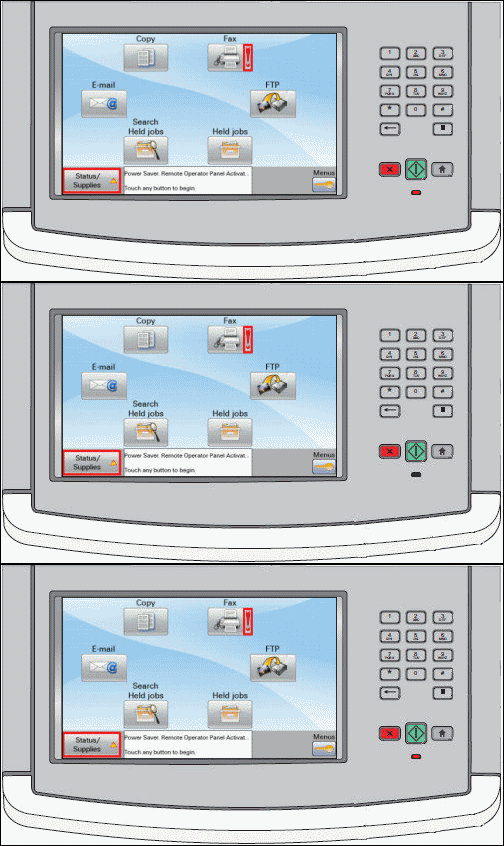
After performing the initial SETUP WIZARD, you notice:
- -The Fax icon has a red exclamation mark on it.
- -The LED* will blink red.
- -The Status/Supplies icon becomes highlighted.
- -If the Fax or Status/Supplies icon is pressed, the message "Fax Server 'To Format' not set up. Contact system administrator" appears.
- -Regardless of action performed on the touch screen User Interface, this condition will persist.
- -By default, all MFPs are programmed for fax functionality.
- -A MFP that was purchased without FAX capabilities (fax/modem card) can still use FAX SERVER mode.
- -If FAX SERVER mode is misconfigured, or not completely configured, the behavior described above will result.
- -Future MFPs with a fax-less configuration will have fax disabled by default.
- -After you complete the Initial Setup Wizard, assuming you did not disable fax, the alert will appear and you will have to manually configure the "To: Format " value.
Explanation
More than one possibility exists for this MFP behavior:
- -Your model version of the product is not equipped with a fax modem and fax server mode is enabled.
- -A specific fax server setting was misconfigured during the initial setup of the device.
- -Another fax server mode setting is incorrect.
Suggested remedy for MFP models not equipped with internal fax modem
Recommended actions, to include:
- -Disable the function through the Run Initial Setup option, or NOTE: This will require a reboot of the MFP.
- -Disable the fax function via Menus option
- -Properly configure Fax Server settings.
Procedure: Disable via Run Initial Setup
WARNING! This option disables the feature in question. Either running the Initial Setup again or entering Menus can be performed to re-enable the function. Perform the following:
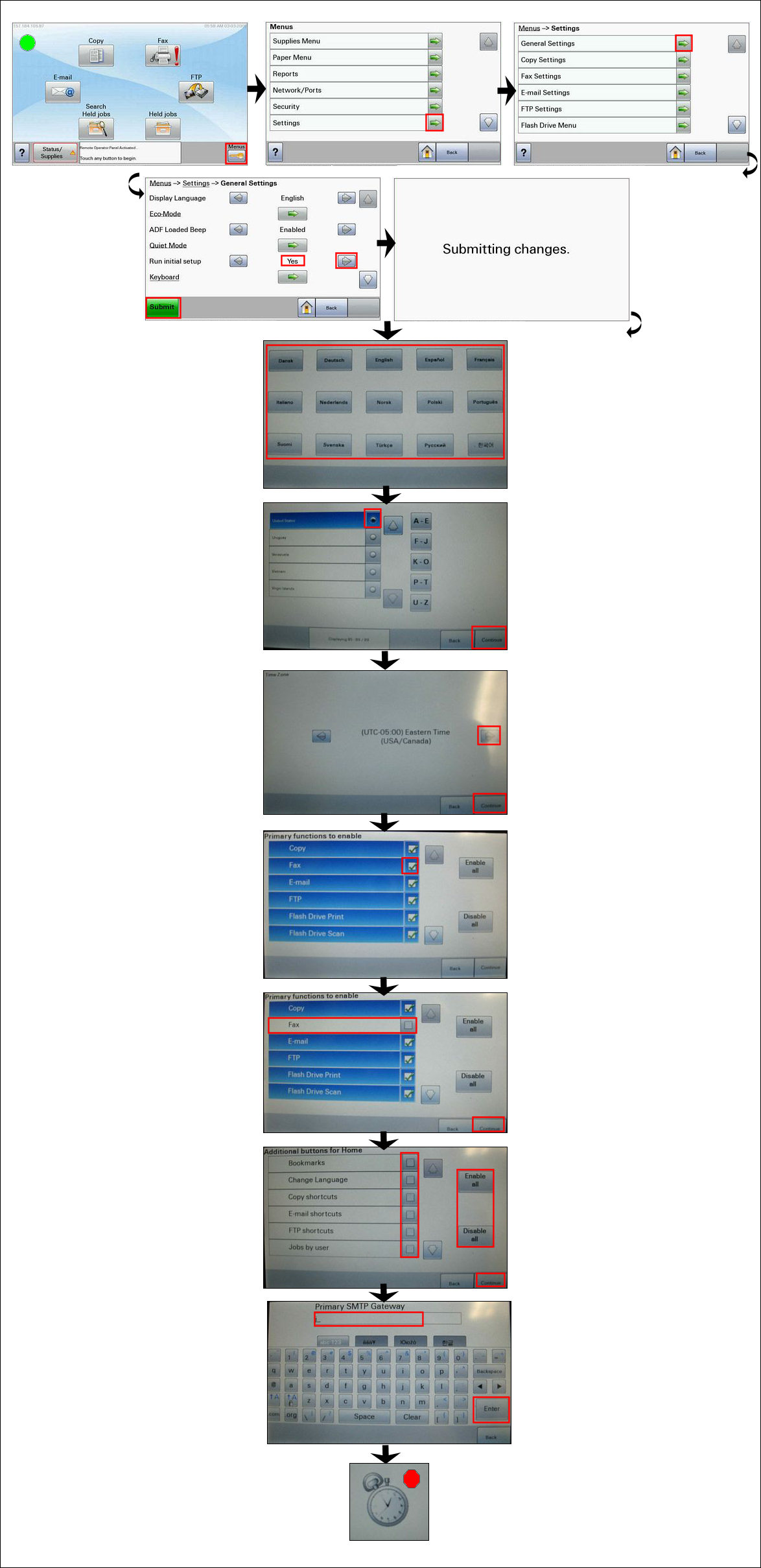
From the operator panel, select Menus > Settings > General Settings > Run Initial Setup > Select Yes > Submit, and then reboot the MFP. Optional embedded web server: Settings >General Settings > Run Initial Setup > Submit, and then reboot the MFP.
Follow setup steps through Language, Country, Time Zone until you reach Functions to Enable.
Deselect the FAX function by removing the check mark next to it.
Click Continue and finish the initial setup.

Procedure: Disable function through Menus
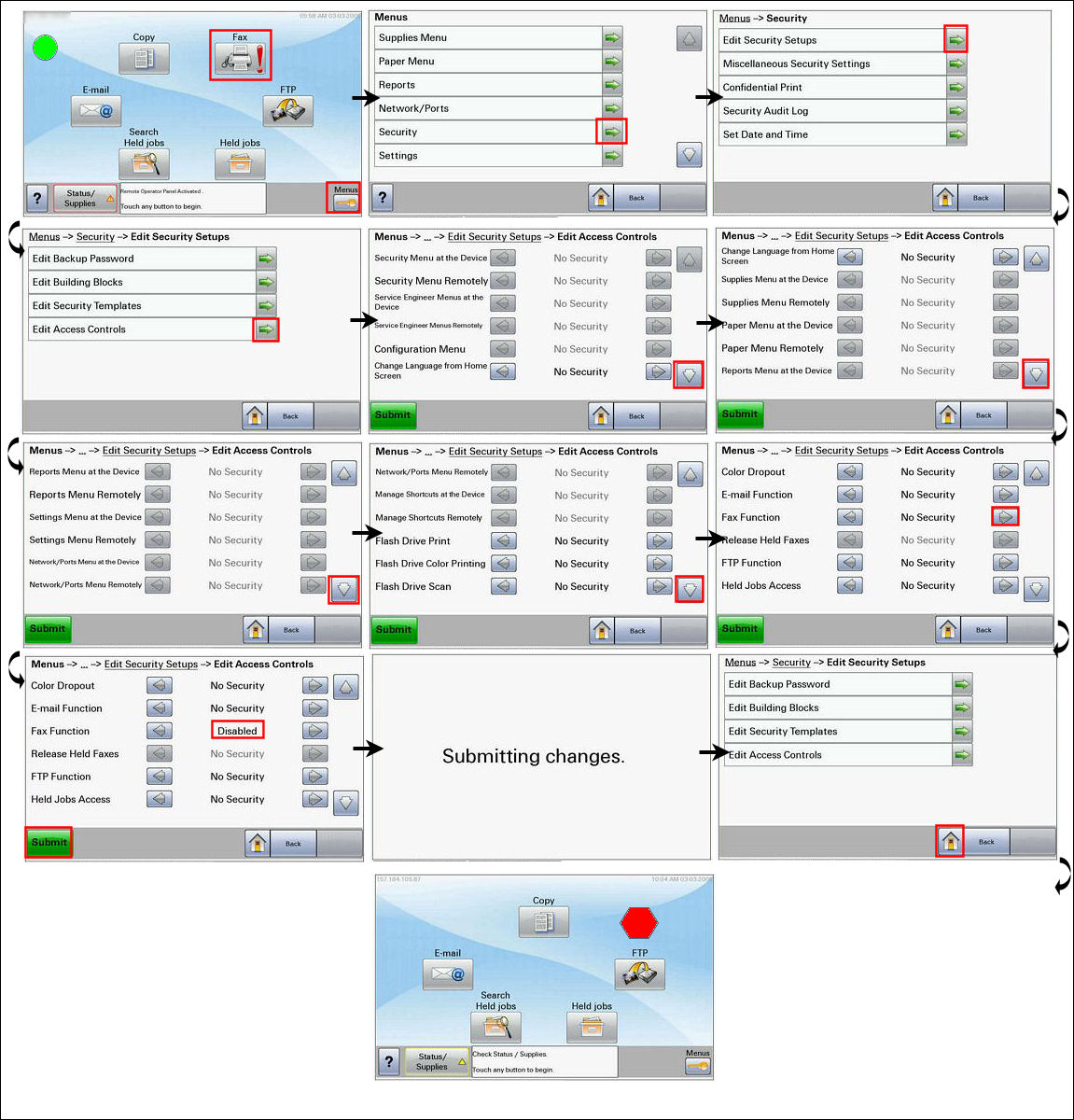
You can disable these functions via the operator panel by pressing the following color touch-screen buttons:
Menus
Security
Edit Security Setups
Edit Access Controls
Scroll to the Fax function(s) and change the status to Disabled.
Click Submit.
Procedure: Fax Server Mode Configuration
Fax Server Mode: Concepts and Configuration for more information.
Contacting Lexmark
If you need additional assistance, please contactLexmark Technical Support.NOTE: When calling for support, you will be asked for your MFP printer/model type and serial number (SN). Please call from near the computer and printer in case the technician on the phone asks you to perform a task involving one or all of these devices.
LEGACY ID: SO4750
Notes:
Infoprint 1850 MFP ----------------------------------------------------------------------------- Infoprint 1860 MFP ----------------------------------------------------------------------------- Infoprint 1870 MFP ----------------------------------------------------------------------------- Infoprint 1880 MFP
Rate this article
We appreciate your feedback. We use it to identify content which needs to be updated for accuracy or usefulness.
Thank you for your feedback!