Support article for Lexmark X651DE
Fax Server Mode: Concepts and Configuration
Purpose
Requirements:
This article provides an overview of fax server functionality and includes the following topics:
- An MFP that is fully configured and operational for e-mail functionality.
- The correct "address scheme" for the "To Format" configuration setting. Hint: Please consult your fax server's end-user documentation or technical support for this value.
- An established fax server domain.
- Confirmation of compatibility with fax server manufacturer.
- If email authentication is required, the proper encryption cipher and device credentials.
Topic 1: Fax Server Configuration Methods
- Touch screen user interface.
- Embedded Web Server. Click here for illustration.
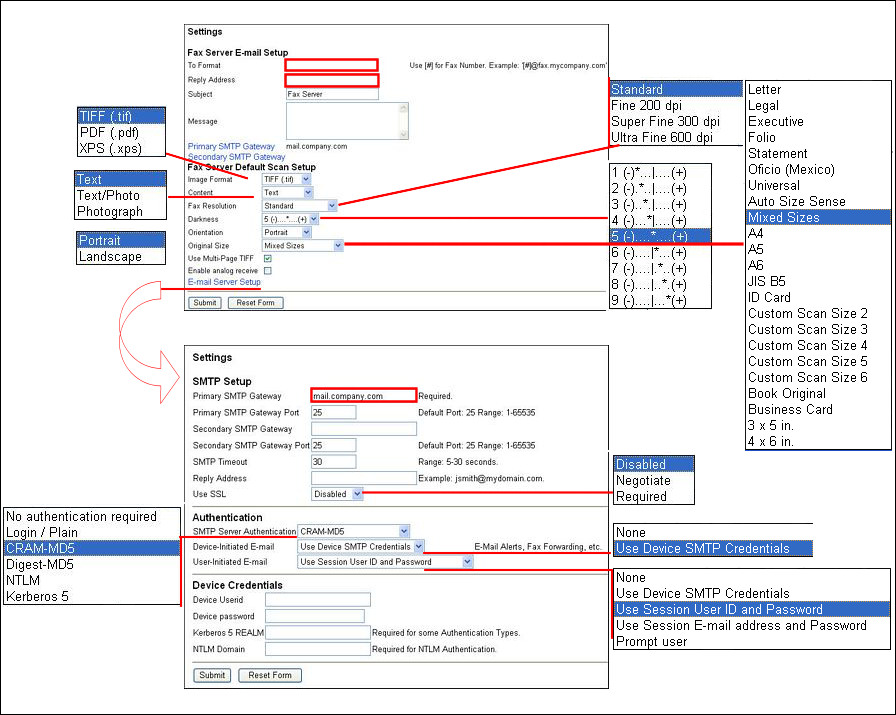
Topic 2: Fax Server Configuration
The "To" Field address scheme is critical to the correct configuration of fax server mode.
Note: Not all fax server manufacturers support this configuration. Notice the slight format differences between these manufacturers:
- /fax=[#]@faxgate.lexmark.com
- "/fax=[#]/" < ailbox@faxgate.company.com
- fax=[#]@faxgate.company.com
IMPORTANT! Failure to enter the correct format will result in a message that reads, "Invalid Format; To Format must follow the specified format". Other comments:
- The MFP's firmware replaces the [#] parameter with the dialed recipient's fax number.
- The 'To' format determines the e-mail address of the fax server.
- The name after the (@) symbol should be the configured domain name that is unique to the fax server.
The "Reply" Field A required "Reply" address informs the user or network/fax administrator of fax transmittal confirmation status. No Authentication ‑ Enter a valid e-mail address to receive all fax confirmation information. LDAP or NT Authentication Users If you authenticate users for fax access to the MFP, enter the following syntax into the reply field: $u@companydomain.com, where$u is the insertion point for the users email ID, and company domain is the user's e-mail domain.
The "Subject" and "Message" fields. The fields are optional and can be used for different purposes.

Topic 3: Required Email Server Settings
- Primary SMTP Gateway address
- Primary SMTP Gateway Port
- Secondary SMFP Gateway (Optional)
- Secondary SMTP Gateway Port (Optional)
- SMTP Timeout (5-30) seconds
- Reply Address
Note: This will be overridden by the reply address specified under the Fax Server Setup.
Available "Authentication" Settings:
- SMTP Server Authentication: No authentication; Login/Plain; CRAM-MD5; Digest-MD5; NTLM; Kerberos 5
- Device-Initiated E-mail: None, Use SMTP User Credentials
- User-Initiated E-mail: None, Use Device SMTP Credentials, Use session User ID and Password; Use session User e-mail address and Password; Prompt user
Available "Device Credentials":
Device User ID
Device password
Kerberos 5 REALM
NTLM Domain
Topic 4: The effects of Fax Server mode
Activation of Fax Server mode will result in: MFP Behavior changes:
- Inbound faxes that utilize the MFP's fax modem are still printed. Suggestion: Do not use the MFP's fax modem and configure the fax server to receive all inbound faxes. If you still need the MFP to print received fax jobs, you can configure the fax server for this purpose.
- All outgoing fax jobs originating at the MFP are routed via e-mail to the fax server.
- Group Faxes are sent to the fax server in a single e-mail, and then the fax server software becomes responsible for dialing individual fax recipients.
Disabled analog fax features:
- Delayed Send under Fax > Options > Advanced via user interface.
- Cover page
- Manual Fax
- Driver Fax with the PostScript System or Universal printer drivers.
LEGACY ID: HO3482
Rate this article
We appreciate your feedback. We use it to identify content which needs to be updated for accuracy or usefulness.
Thank you for your feedback!