Support article for Lexmark X464
ADF Jam during duplex scans or copies
Overview
The error code 294.04 and 294.05 Scanner Auto Document Feeder (ADF) jam occurs between one or two pages when scanning/copying duplex (i.e., two-sided) on the ADF. The following are actual errors that may appear:
- 294.04 Scanner jam, remove all originals from the scanner; the jam is at the ADF exit sensor.
- 294.05 Scanner jam, remove all originals from the scanner; a jam is detected at the ADF exit sensor.
Clearing jams under the ADF cover
| Step | Action | Click Image to Enlarge |
| 1 | Remove all original documents from the ADF Input Tray and open the ADF cover. | 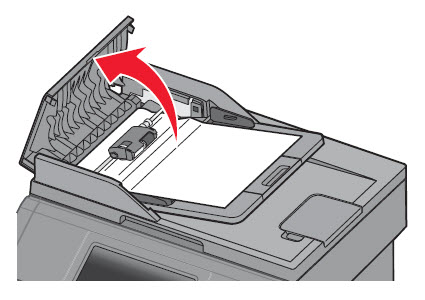 |
| 2 | Unlock the ADF separator roll. | 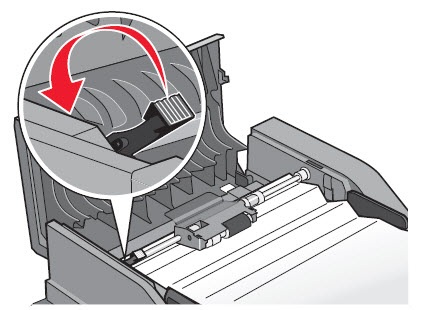 |
| 3 | Remove the ADF separator roll. | 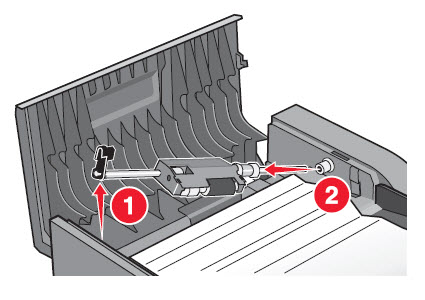 |
| 4 | Remove the jammed media. | 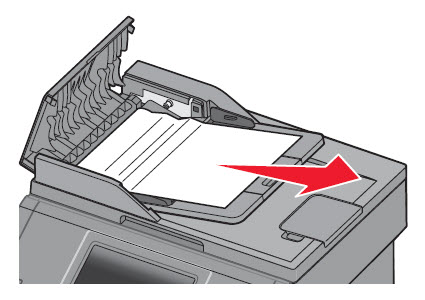 |
| 5 | Reinstall the ADF separator roll. | 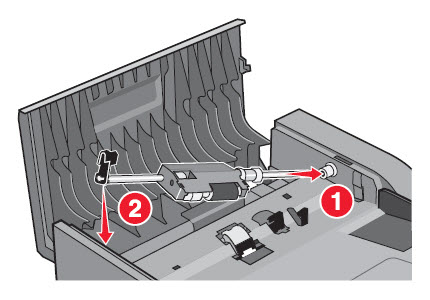 |
| 6 | Lock the ADF separator roll. | 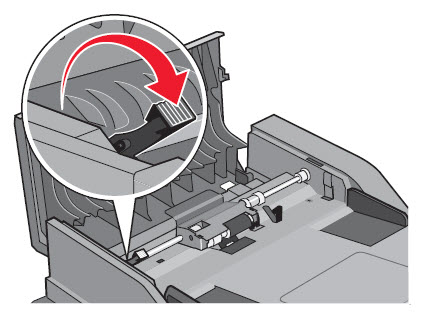 |
| 7 | Close the ADF top cover and resume the scanning job. Note: If the errors are consistent, contact Lexmark Technical Support for additional troubleshooting suggestions. | No image |
If the issue persists, search for more information related to this issue or contact support for further assistance.
LEGACY ID: TE465
Rate this article
We appreciate your feedback. We use it to identify content which needs to be updated for accuracy or usefulness.
Thank you for your feedback!