Support article for Lexmark T654
Troubleshooting a 202 paper jam
Issue description
Either the printer repeatedly jams paper each time you print, or a Paper Jam message displays on the screen and no paper can be found in the printer. The numeric error code that appears on the printer screen is a '202' type error. Examples include 202.01, 202.12, 202.54, etc. A 202 type error indicates the printer has registered one or more sheets of paper as having jammed in the back of the machine.
Solution
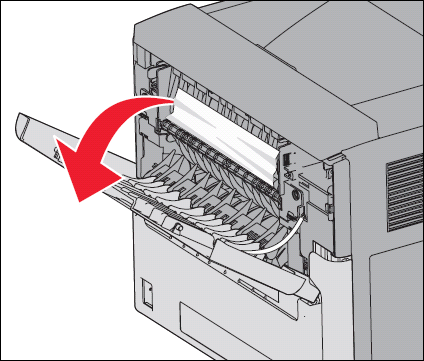
If you can see the jammed page exiting the printer, carefully remove it. If you cannot see the jammed page, go to the back of the machine and
open the upper-rear cover . Remove any jammed sheets of paper you find.- If the print job consisted of only this one page, close the cover. Press the Check button button to clear the error, and then try printing again.
- If the print job consisted of more than one page, or if you cannot find a page jammed inside the machine, confirm the entire paper path is clear before printing again. Continue with the steps below.
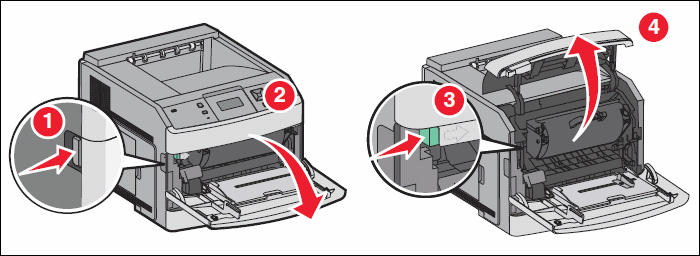
Go to the front of the printer and open the upper-front cover. Remove the toner cartridge and look inside the printer. Remove any jammed sheets of paper that you find.
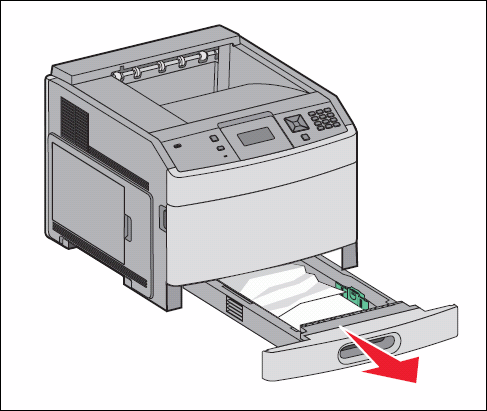
Remove the top paper tray (Tray 1). Remove any jammed or partially-fed sheets of paper that you find.
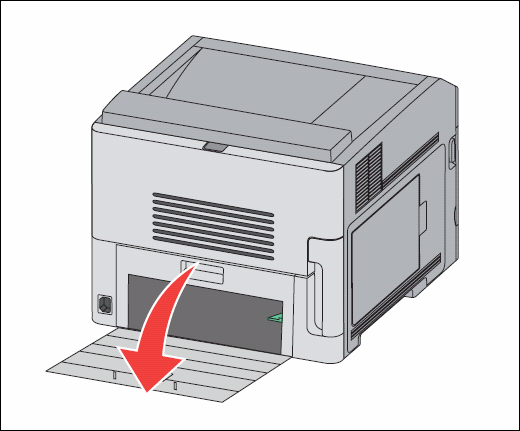
Leave Tray 1 out. Go to the back of the machine again and open the lower-rear cover to access the duplex area. Push the green tab down and look inside for any jammed paper. Remove any jammed paper you find.
Note: The T650 models have a separate duplex option that may or may not be installed. If a duplex option is attached, check inside the rear cover of the duplex option. If a duplex option is not installed, skip this step.
Once you have confirmed that the entire paper path is clear, close the lower and upper rear covers. Reinstall the toner cartridge and the paper tray and close the upper front cover. Press the Check button to clear the error, then try printing again.
Warning—Potential Damage: If you cannot locate a sheet of paper jammed anywhere in the machine, power off the printer. Reinstall the toner cartridge and the paper tray and close all the covers. Power the printer back on. If a 202 or other paper jam error continues on power up, a sensor in the printer may be malfunctioning. This will require a service call to correct the issue. Please contact Lexmark Technical Support for additional information.


If the jamming continues
If you are able to locate and clear the jammed paper, but the printer continues to jam paper each time you print, check the following:
- Are you printing on regular plain bond copy paper? If not, try printing again with plain copy paper. This will eliminate specialty media as part of the cause of the jamming. Certain specialty paper, label stock, and card stock, are more difficult for the printer to feed and therefore more prone to jamming.
- If you have a Lexmark T650 printer with a duplex option installed and it is experiencing repeated paper jams, check the numeric error code it displays. If the error code is '202.11', a piece of tape may be stuck on the rear of the printer, behind the duplex option. For more information about this issue, 202.11 paper jam: Check for a piece of tape on the back of the printer..
- If you are printing on both sides of the paper (front and back), try printing single-sided pages. If single-sided pages print properly, check the duplex area of the printer again for any jammed pages or other obstructions.
LEGACY ID: SO4839
Rate this article
We appreciate your feedback. We use it to identify content which needs to be updated for accuracy or usefulness.
Thank you for your feedback!