Support article for Lexmark T644
‘32 Unsupported Print Cartridge’ error message
Issue description
A 32 Unsupported Print Cartridge error message appears whenever the printer thinks the wrong toner cartridge is installed. The printer can also display this error when a cartridge that is manufactured or refilled by a third party is installed into the printer.
Solution
Confirm that the toner cartridge is correct
Open the lower and upper front covers.
Confirm that the installed toner cartridge is the correct cartridge for this printer.
- Read the sticker on the toner cartridge. Make sure that your printer model is listed as a compatible printer on the cartridge. If the sticker on your cartridge is damaged or missing, check the packaging the cartridge came in with to confirm that your printer is listed.
- If you do not see a list of compatible printers on the cartridge or box, find the part number on the cartridge and consult the table below for a list of compatible toner cartridges.
Part Number Description 64004H_ T640, T642, T644 High Yield Return Program Cartridge for Label Applications
64015H_ T640, T642, T644 High Yield Return Program Print Cartridge
64015S_ T640, T642, T644 Return Program Print Cartridge
64035H_ T640, T642, T644 High Yield Print Cartridge
64035S_ T640, T642, T644 Print Cartridge
64404X_ T644 only - Extra High Yield Return Program Cartridge for Label Applications
64415X_ T644 only - Extra High Yield Return Program Print Cartridge
64435X_ T644 only - Extra High Yield Print Cartridge
Note: "_" at the end of each part number below can be any letter. The last letter of the cartridge part number differs depending on the geographical region. For example: "A" = USA & Canada, "E" = Europe, Middle East, & Africa, "R" and "P" = Asia & Pacific Region, "L" = Latin America. The part numbers listed in the table are current as of December 2006. If you cannot find your cartridge in the table , you can contact Lexmark Technical Support to find out if your cartridge is compatible.
If the wrong toner cartridge is installed, remove it and install the correct cartridge.
- Confirm that you are using an original Lexmark brand toner cartridge. Cartridges manufactured by a third party may not be compatible with the printer. If a third-party cartridge is causing this error, contact the point of purchase for additional support.

Check for a refilled, incorrectly installed, or defective cartridge
If the correct toner cartridge is installed, confirm that it has not been refilled or reworked in any way. Refilling the toner cartridge can trigger this error.
- If the cartridge has been refilled or reworked, contact the place where it was refilled to have it replaced.
If the cartridge has not been refilled or reworked in any way, it is not be seated correctly. Try reseating the toner cartridge.
Power off the printer.
Remove the toner cartridge.
Inspect the toner cartridge and the inside the printer for any obstructions or damage. Remove any obstructions you find.
Reinstall the toner cartridge. Make sure that it is seated all the way into the printer.
Close the upper front cover.
Power on the printer with the cartridge installed.
If reseating the cartridge does not clear the error message, the installed toner cartridge is broken.
Note: This is particularly likely to be the case if the error started when you installed this toner cartridge for the very first time.
Power off the printer.
If this is a brand new cartridge, install the old cartridge.
Note: If the old cartridge is unavailable or this is not a new cartridge, try installing a known working toner cartridge from another printer or another new toner cartridge, if one is available.
Power the printer back on after installing the original cartridge, or a different, but compatible cartridge.
If the Unsupported Cartridge error disappears with a second cartridge, the problem lies with the original cartridge.
Additional notes
- If this is an original Lexmark toner cartridge, please contact the point of purchase first. They may have a replacement policy.
- If the point of purchase cannot help or if the cartridge was purchased directly from Lexmark, please contact Lexmark using the same phone number or address you used to order the cartridge.
- If you cannot remember or locate the number you used to contact Lexmark to order the cartridge, contact Lexmark Technical Support. A representative there may be able to provide assistance.
Check the cartridge contacts
- If another toner cartridge is unavailable, check the contact board on the print cartridge for damage. If damaged, the toner cartridge must be replaced. Also, make sure that the contact board is clean and free of toner or other contamination.
- In addition, check the contact pins inside the printer. Make sure they are not damaged or missing. For safety reasons, power off the printer before touching the contact pins. The contact pins are located inside the printer on the right-hand side.
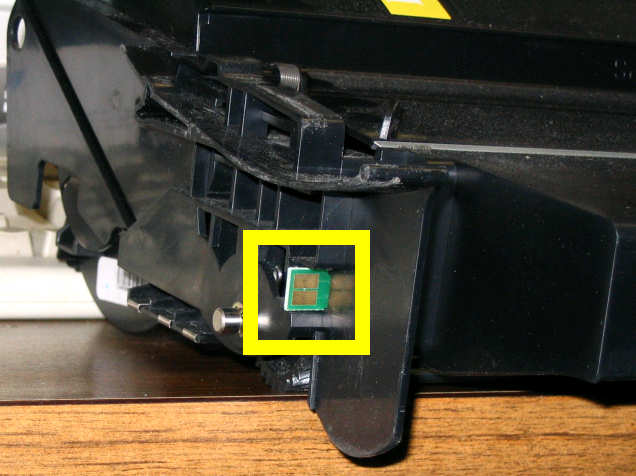
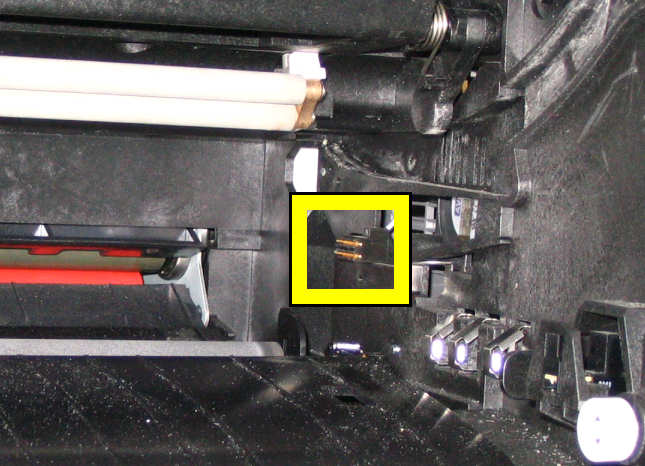
Note: An intermittent Unsupported Cartridge message is most likely caused by poor contact between the cartridge contacts and the contact board on the cartridge.
Check for a loose cable
If you cannot clear the error with another toner cartridge, a small cable inside the printer is loose. Click here for more information.
LEGACY ID: SO3691
Rate this article
We appreciate your feedback. We use it to identify content which needs to be updated for accuracy or usefulness.
Thank you for your feedback!