Support article for Lexmark T640
How to Install a Duplex Option on a Lexmark T64x Series Printer
- For the Lexmark T640 printer, you should use the 250-sheet duplex option.
- For the Lexmark T642 and T644 printers, you should use the 500-sheet duplex option.
Note: If you are installing a duplex option some time after setting up the printer, turn the printer off. It will also help to unplug the power cord and disconnect any other cables attached to the printer so that you will be able to move the printer around more easily.
If you have any optional input drawers, like a 250-sheet, 500-sheet, or 2000-sheet feeder option, these should be set up first because the duplex option and the printer will sit on top of them. If you do not have any of these feed options or they are already set up, continue to the next step.
If this is a newly purchased duplex option, remove the access tray from the support unit. Remove all packing material and tape from both the support unit and the access tray. Reinstall the tray back into the duplex unit.
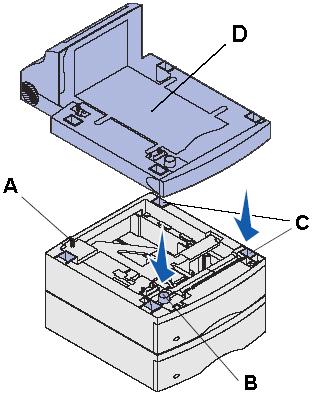
Place the duplex unit on top of any previously installed drawe rs or onto the table or printer cabinet where you plan to use the printer. Make sure it is securely in place. NOTE: There is a tab ( A), round peg ( B), and square holes ( C) on top of the drawer options. These features should help you position the duplex unit ( D) so the edges are aligned properly.
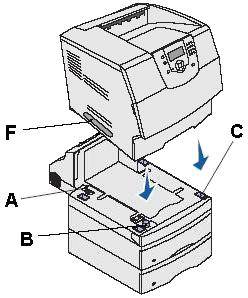
Once you have all of the feed options installed, place the printer on top of all the input options. Ask someone to help you lift the printer by the handholds ( F) and lower it onto the duplex unit. There is also a tab ( A), round peg ( B), and square holes ( C) on top of the duplex unit that will help you position the printer so the edges are aligned properly. Make sure the printer is securely in place.
Reinstall any disconnected cables.
Power on the printer.
Try printing an internal test page to make sure the duplex is reading as installed.

LEGACY ID: HO2351
NOTE:ALWAYS RECOMMENDED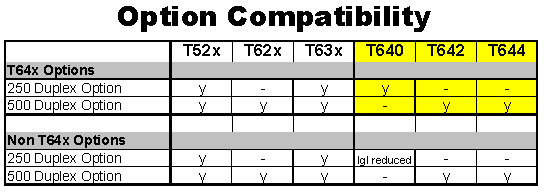
LEGACY ID: HO2351
Notes:
Floor-mounted configurations may require additional furniture. You should also use either a printer stand or printer base if you are using a 2000-sheet drawer, a duplex unit and an input option, or more than one input option.
Rate this article
We appreciate your feedback. We use it to identify content which needs to be updated for accuracy or usefulness.
Thank you for your feedback!