Support article for Lexmark T640
Lexmark Document Distributor (LDD) v4.5, v4.6 and v4.7 server installation types
Overview
This article provides simple suggestions regarding the planning of your LDD infrastructure and some formulas to help calculate hardware requirements.
Article contents
LDD installation typesMinimum and recommended system requirementsSystem sizing guidelines
LDD installation types
This is standard LDD installation for larger systems and more demanding applications. Installing an Enterprise system lets you install the database, load balancer, and application servers on different computers to create a reliable and scalable system.
Adjustments have been made on the latest LDD version. Select the LDD version below to view the hardware configurations, description, advantages, and disadvantages for enterprise systems:
See sample installation per component below:
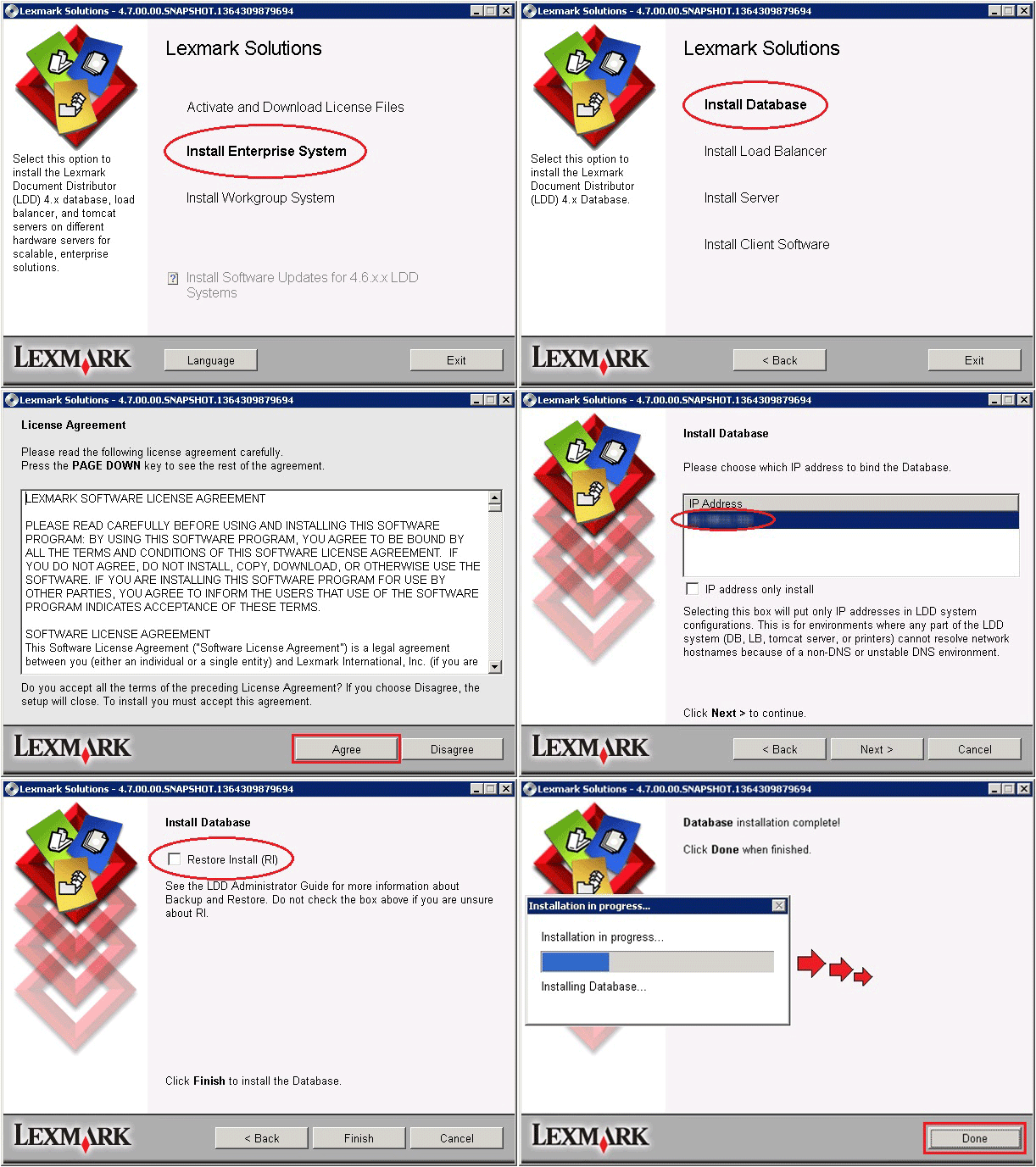
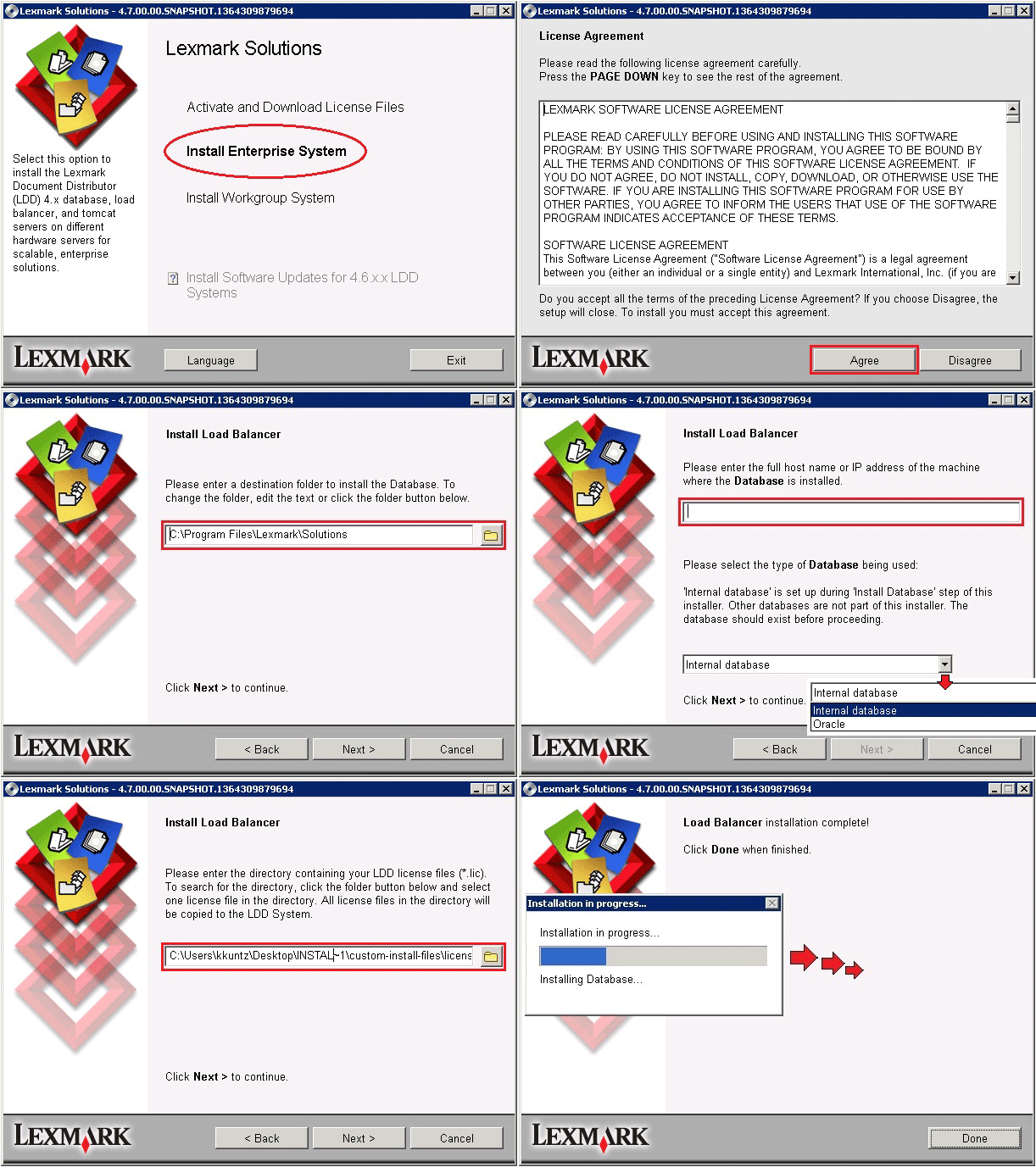
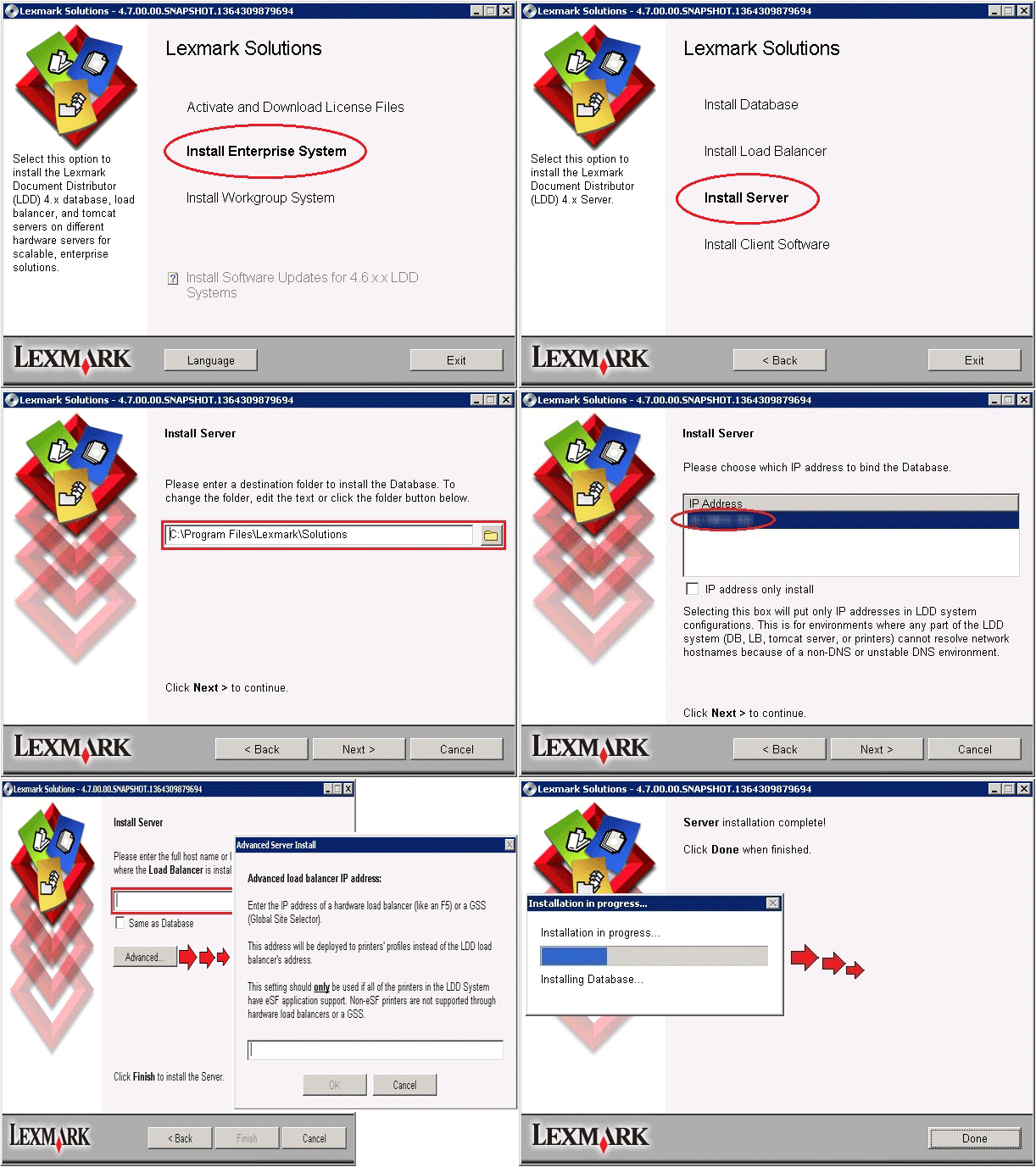
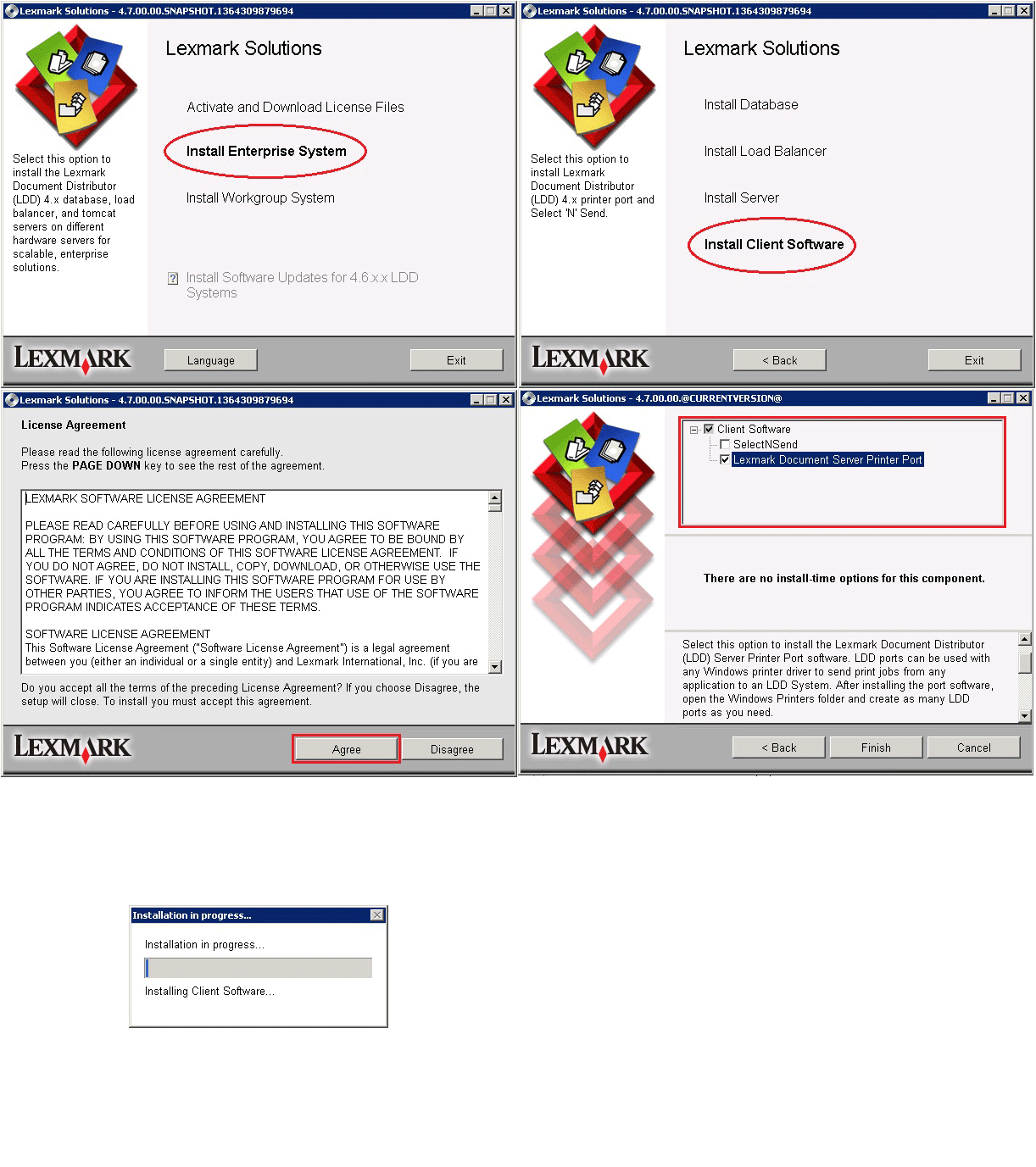
Note: The Print Release solution needs to be manually imported in this environment.
Workgroup system
This is an LDD installation with a packaged solution for smaller systems. Installing a workgroup system quickly installs the database, load balancer, and one application server on a single computer.
| Description | Database (DB) , Load Balancer (LB), and server on single computer |
| Advantages | Minimum equipment; Quick install |
| Disadvantages | No failover for DB or LB, limited resources |
See sample installation below:

Note: The Print Release solution is installed during the installation.
Installing LDD 4.5 and 4.6 Enterprise system
You can utilize the following hardware configurations when installing a LDD 4.5 or 4.6 Enterprise system.
NOTE:Components: DB – Database; LB – Load Balancer; Server
| Configuration Illustrations | 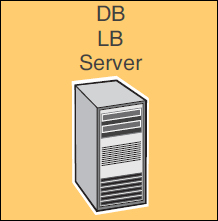 | 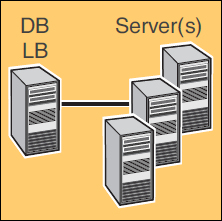 | 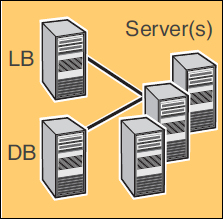 | 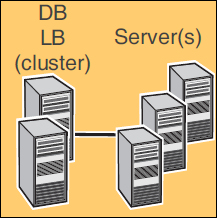 | 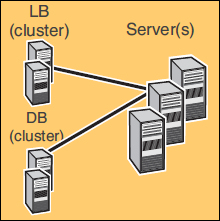 |
| Configuration | 1 | 1-N | 1-1-N | X-N | X-Y-N |
| Description |
|
|
|
|
|
| Advantages | Minimum equipment | Improved performance | Further improved performance | High availability; improved performance | High availability; further improved performance |
| Disadvantages | No failover for DB or LB; limited resources | Increased hardware needs; no failover for DB or LB | Further increased hardware needs; no failover for DB or LB | Increased hardware needs, and cluster licensing. | Further increased hardware needs, and cluster licensing. |
Notes | Not recommended for an enterprise environment | Most common setup when failover is not used | E-1-N configuration is possible E.g., An external Oracle database may be installed in place of the standard database. The externalDB (E) and LB are on separate computers, and the server is on one or more additional computers. | Most common setup when using failover) Server(s) * Cluster Server for failover | E-1-N configuration is possible. E.g., An external Oracle database may be installed in place of the standard database. The externalDB (E) and LB are on separate computers, and the server is on one or more additional computers. * Cluster Server for failover |
 Installing LDD 4.7 Enterprise system
You can utilize the following hardware configurations when installing a LDD 4.7 Enterprise system.
NOTE:Components: DB – Database; LB – Load Balancer; Server
| Configuration Illustrations | | |
| Configuration | 1-N | X-N |
| Description |
|
|
| Advantages | Improved performance | High availability; improved performance |
| Disadvantages | Increased hardware needs; no failover for DB or LB | Increased hardware needs, and cluster licensing. |
Notes | Most common setup when failover is not used | Most common setup when using failover) Server(s) |
Minimum and recommended system requirements
| Category | Requirement | Recommended for Enterprise systems |
| Operating system | Any of the following Windows Servers for the following LDD versions. LDD 4.5
LDD 4.6
LDD 4.7
| Windows Server 2003 R2 Standard Edition with SP2 |
| Processor | 2GHz dual-core | LDD 4.5
LDD 4.6 and 4.7
|
| RAM | 2GB | 4GB |
| Hard disk drive | 20GB free space for each system component
| Configuration 1-N, X-N, or X-Y-N:Database and load balancer
Note:For information about configuring servers for only Lexmark Management Console(LMC), or jobs, see “Assigning servers to only run LMC or process jobs” in the LDD Administrator's guide. |
| Network speed | 100Mbps network
| Gigabit Ethernet using dual-port network adapters. |
| Network name resolution | Domain Name System (DNS) or Windows Internet Name Service (WINS) Notes:
| Same |
| Static addressing |
– It is installed on a cluster. – Any e-Task printers are used with the system. – Any printers used with the system do not have a DNS server configured. | Static IP addresses are recommended for all system components and any e-Task printers used with the system. |
System sizing guidelines
Two main factors which determine the number of servers required to process jobs efficiently.
Peak demand
Usually the deciding factor when the average execution time for a solution is under 30 seconds.
The following formulas determine the number of servers necessary to handle peak loads for a particular solution:
- (System-wide hourly job rate) = (System printer capacity) x (Jobs per printer per day) / (Length of business day)
- (Peak demand) = 2 x (System-wide hourly job rate)
- (Minimum number of servers) = (Peak demand) / (Single-server throughput for current solution)
Calculation example
There is capacity for 300 printers in your system and each printer in your system averages 100 jobs per day.
Perform the following calculations:
- Determine the system-wide hourly job rate: (300 printers) x (100 daily jobs/printer) / (8 hours/day) = 3750 jobs/hour
- Determine the peak demand: 2 x (3750 jobs/hour) = 7500 jobs/hour
- Determine the minimum number of servers: (7500 jobs/hour) / (3000 jobs/hour) = 2.5
NOTE:
In conclusion, this system should include three servers to reliably handle the peak load for a solution with average execution time below 30 seconds.Typical server throughputs
| Solution processing load | Functions used | Average single-server throughput |
| Typical |
| 6000–8000 jobs per hour (estimate) |
| Heavy |
| 2000–3000 jobs per hour (estimate) |
| Very heavy |
| 100–200 jobs per hour (estimate) |
NOTE: The single-server throughput for a solution must be determined by the solution developer; but these throughput estimates are relatively accurate if recommended hardware specifications are met. Using less than the recommended RAM significantly reduces throughput. For example, a dual-processor server with only 2GB of RAM can process only 600–800 jobs/hour when using a “heavy” solution.
Concurrency
Usually the deciding factor when the average execution time for a solution is over 30 seconds.
The database, when installed on the recommended hardware and connected using Gigabit Ethernet, can process 200,000 logged messages per hour, which is approximately 40,000 jobs per hour when using a typical solution (five logged messages per job).
Notes:
- If this limit is reached, it may be necessary to use multiple LDD systems.
- Each server that meets recommended requirements can process 30 concurrent jobs from clients. The following formula determines the number of servers necessary to meet concurrency requirements:
- (Minimum number of servers) = (Number of printers expected to submit jobs near the same time) /30
Calculation example
If 1/3 of the 300 printers in the last example might be active at the same time: 100 / 30 = 3.33
Note: In conclusion, the system should include four servers to allow for 100 active printers for a solution with average execution time above 30 seconds. For more information on adjusting concurrency limits on servers, see the supplemental document Managing system performance included with Lexmark Document Distributor.
LEGACY ID: FA782
Rate this article
We appreciate your feedback. We use it to identify content which needs to be updated for accuracy or usefulness.
Thank you for your feedback!