Support article for Lexmark E360
Accordion type paper jam in the fuser unit
What You Will See
A sheet of paper has folded up tightly inside the back of the printer. One edge of the jammed page may be slightly visible, though not necessarily. When you try to remove the jammed sheet of paper, it tears into pieces rather than coming out as an entire sheet.
Explanation
The paper has jammed in the fuser unit. The fuser unit is composed of a set of rollers that heat the toner, thus fusing the toner onto the page. If the leading edge of a page jams as it feeds through the fuser unit, the fuser rollers will continue to turn. This forces the entire page into the fuser unit, by folding it into a 'fan-fold' or 'accordion' pattern. The fuser rollers are pressing down on the jammed page with a large amount of force. This can make it extremely difficult to remove the page without tearing it. To reduce some of the pressure, open the front cover before attempting to remove the jammed page. IMPORTANT! Avoid using any metallic item, such as a screwdriver or pliers, when trying to retrieve paper that is stuck in the fuser rollers. There is a good chance that the metal will scratch the surface of the rollers. If that happens, a line will begin to appear on all pages printed.
Recommended Action
Power off the printer.
Open the front cover.
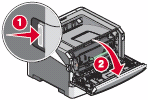
Remove the photoconductor and toner cartridge (collectively known as the print unit).
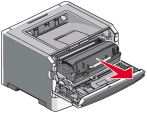
Look into the printer. If you can see the trailing edge of the page, attempt to remove the entire p age by pulling it at that point.
If you cannot see the trailing edge of the page, or if the page does not remove easily, open the rear door of the printer.
IMPORTANT! Leave the front cover open. This will make it easier to remove any jammed paper.
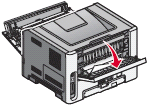
Try to locate the jammed page from the back of the printer. If you can find the page, carefully remove it.
- If you can find and remove the jammed page, reinstall the print unit. Close the covers and power on the printer. Try printing again.
- If you are unable to remove the jammed page, or if part of the page tears off and remains in the printer, the fuser unit will need to be replaced. This will require a service action on the printer. For assistance in setting up service, please contact Lexmark Technical Support or a local authorized service provider.
If the jamming continues to occur, check the type of print media that you are printing on. If you are printing on anything other than plain copy paper, please test the printer by printing on plain copy paper. Do this before arranging service on the printer. This will eliminate print media from being a possible cause of the issue.
NOTE: Speciality paper (such as rough textured paper, lightweight paper, and pre-punched paper) and heavier media (such as labels and light card stock) are more difficult to feed, as w ell as being more prone to jamming in the fuser unit.
If the jamming continues to occur after trying all of these suggestions, the printer may require a service action in order to correct the issue. For more information or assistance in setting up service, please contact Lexmark Technical Support or a local authorized service provider.

If the issue persists, search for more information related to this issue or contact support for further assistance.
LEGACY ID: SO4611
Rate this article
We appreciate your feedback. We use it to identify content which needs to be updated for accuracy or usefulness.
Thank you for your feedback!