Support article for Lexmark E260
31.xx Missing or Defective Cartridge error
Issue description
This article outlines the steps to troubleshoot a 31.xx Missing or Defective Cartridge error.
Solution
IMPORTANT REMINDER!
- Confirm that you are using an original Lexmark brand toner cartridge. A third-party cartridge may not be compatible with the printer. If a third-party cartridge is installed, try an original Lexmark cartridge.
- Confirm that this toner cartridge has not been refilled or reworked. If it has, try an original Lexmark cartridge. A refilled toner cartridge can trigger this error. If replacement corrects the issue, contact the place where the other cartridge was refilled to have it replaced.
Note: If this corrects the issue, you will need to contact the point of purchase for questions about, or replacement of, the cartridge.
Check whether the cartridge is installed in the printer. If so, re-install it and ensure that it is properly seated inside the printer. Should you have already tried this and the error appears intermittently, proceed to Step 2.
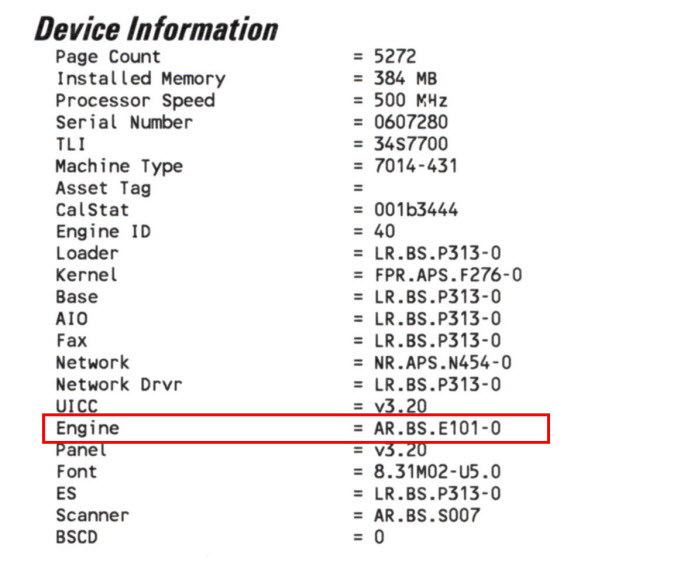
Check your printer’s Engine Code Level. Follow any of the applicable options to do so. Then proceed to Step 3.
- If the error is intermittent and you are still able to have the printer in Ready state, print the Menu Settings page. Click here to see the steps. You should be able to find the Engine Code Level under the heading “Device Information". Click here for sample image.
- If the error still does not allow you to bring the printer to Ready, but your printer is connected to the network via an Ethernet cable, then access the printer’s EWS. To do this, open your Internet Explorer or any other browser and type the printer's IP address on the browser’s address bar.
If the Engine Code Level is not 201c(or the latest) for E260/E360/E46x printers and 101c(or the latest) for X46x printers, use the Authorization Key Code below to download the latest code from the Lexmark website.
Printer Model/s Authorization Key Code For E260, E36x, E46x ex6xengine For X46x x46xengine After downloading the latest code, update the firmware. Navigate to the Firmware section of this product page for different methods to update the firmware.
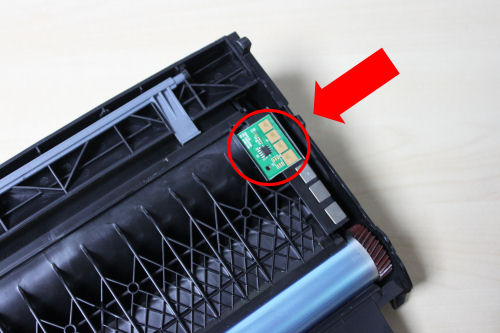
Verify whether the error has been cleared. If issue persists, contact Lexmark Technical Support. Prepare a copy of the printer's latest Menu Settings page and a picture of the print cartridge contacts. Click here to see its location. Be ready to fax or email it upon request.

How to Print the Menu Settings Page
For Lexmark E260 – While the printer is in Ready state, press and release the Continue Button (green button) on the front panel.
For Lexmark E360/E46x
Press the Menu button.
Scroll through the options using the arrow buttons and look for Reports.
Press the Check button.
Browse the options under Reports and look for Menu Settings. Press the Check button to start printing.


For Lexmark X46x
Touch the Menu button on the control panel.
Touch the green arrow button next to Reports
Touch the green arrow button next to Menu Settings to start printing.


LEGACY ID: SO5437
Rate this article
We appreciate your feedback. We use it to identify content which needs to be updated for accuracy or usefulness.
Thank you for your feedback!