Support article for Lexmark C925
Ghost or Residual Images on the Lexmark C925 and X925 Series Printers
What You Will See
A residual image (also referred to as a 'ghost' or an 'echo' image) is a lighter copy of text or an image printed previously in the document. (See red-outlined examples in the images below.) The residual image will usually appear in one color only: black, cyan,
magenta
, or yellow. These colors correspond to the four different toner cartridges.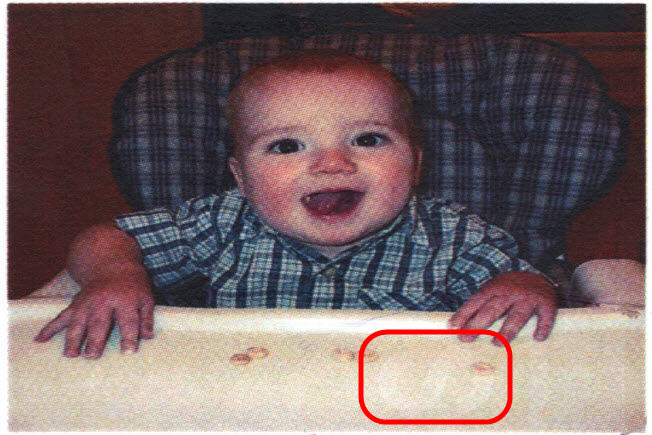 | 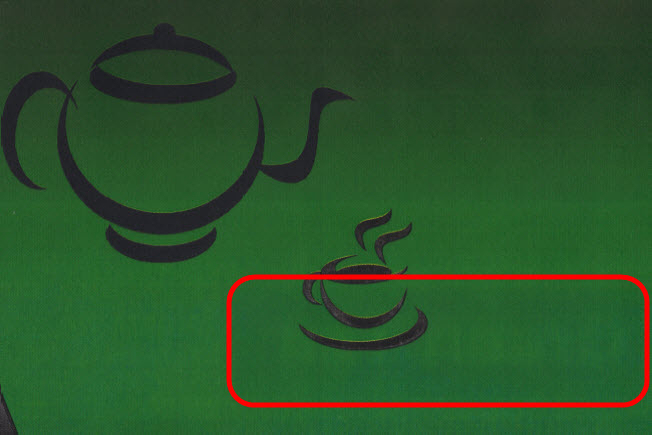 | 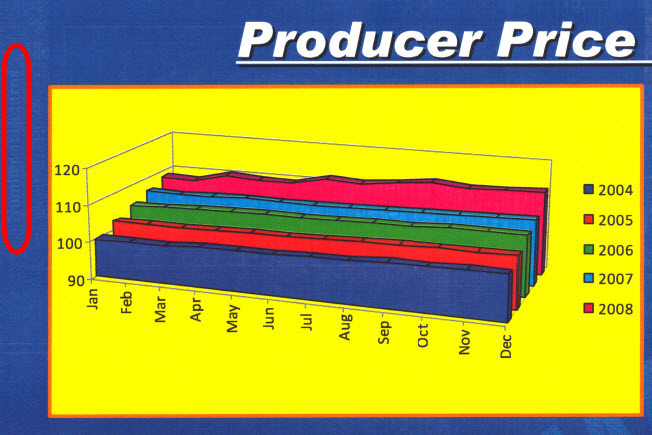 |
| Sample 1 | Sample 2 | Sample 3 |
When dealing with this type of issue, please refer to the directions in the table below:
Troubleshooting
| Steps | Action |
| 1 | For a print quality defect of this type, it is always advisable to print the following;
|
| 2 | Using the Menu Settings page, check the levels of the consumable supplies. If any of your other supplies are low, replace them to see if this resolves the issue. Many print quality issues are caused simply by a supply item that is at or near the end of its expected functional yield. Resend the print job to the printer. Did the issue return? Yes: Continue to Step 3.No: If the page prints, the printer is functioning correctly.
|
| 3 | If the supply levels are adequate, verify whether the paper/media type is within printer’s specification. Using paper/media outside of the recommended guidelines may result in unsatisfactory print quality.
|
| 4 | If the print quality defect appears to be repeating on the page at a regular interval, refer to the Print Quality Pages and Print Defects Guide to determine the cause of the issue. |
| 5 | If the print quality defect appears at random intervals, refer again to the Menu Settings Page. Look for ‘Paper Menu’ on one of these pages and check the Tray Size and Tray Type in this section. If the Tray Size and Tray Type do not match with the paper in the tray, change them to the correct settings. To view the current paper type settings for each tray, use the printer operator panel to access the Paper Type setting under the Paper Menu. |
| 6 | Confirm that the computer or program has the correct paper type set before sending the job to print. Resend the print job to the printer. Did the issue return? Yes: Continue to Step 7.No: If the page prints, the printer is functioning correctly. |
| 7 | Are you printing on regular plain bond copy paper? If not, try printing again with plain copy paper. This will eliminate specialty media as a possible partial cause of the issue. Resend the print job to the printer. Did the issue return? Yes: If the issue persists, a service action may be required in order to correct the issue. For assistance in setting up service, please contact Lexmark Technical Support or a local authorized service provider.No: If the page prints, the printer is functioning correctly. Pay close attention to the printer over the next few days, however, to see if the issue returns.
|
Still Need Help?
Please contact Lexmark Technical Support if you need additional assistance.
NOTE: When calling for support, you will be asked for your machine/model type and serial number (SN). If you need help locating these,
Please call from near the printer in case the technician on the phone asks you to perform a task involving the printer.
LEGACY ID: SO6302
Rate this article
We appreciate your feedback. We use it to identify content which needs to be updated for accuracy or usefulness.
Thank you for your feedback!