Unable to set A5 paper size for option trays
When attempting to change the paper size for an option tray to the A5 paper size, the option does not appear in the drop-down menu, and therefore cannot be selected.
Issue Description
When attempting to change the paper size for an option tray to the A5 paper size, the option does not appear in the drop-down menu.
To have this paper size available, the tray configuration may need to be changed in the configuration menu.
Explanation
For the MS531, MS631, MS632, M3350, MX532, MX632 and XM3350 printers and MFPs, the A5 paper size is only supported in the 550 or 250 sheet option trays if the paper is loaded in short edge first (SEF) orientation.
If the ‘A5 loading’ setting has been changed to ‘Long Edge’, the A5 paper size will disappear from the paper menu for all installed option trays.
Solution
- From the control panel or from the Embedded Web Server (EWS), navigate toAccess the printer EWS by typing the printer IP address into the URL field of your browser (e.g., Internet Explorer, Mozilla Firefox, Google Chrome, Safari). For example, enter http://MFP_IP_Address, where MFP_IP_Address is the IP address of the printer.
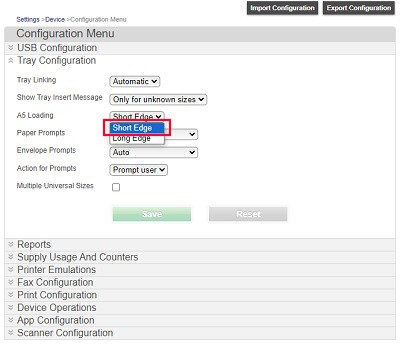
- SetA5 LoadingtoShort Edge, as shown below.
If the issue persists, search for more information related to this issue or contact support for further assistance.