655.84, 31.40R, 31.40Y, 31.60Q, and 31.60R errors
The printer displays 655.84, 31.40R, 31.40Y, 31.60Q & 31.60R errors but may also post 84.11K, 84.12K, 84.13K, 84.21K, 84.22K, 84.23K 84.31K, 84.32K, 84.33K, 84.41K 84.42K, 84.43K or 88.10K, 88.20K, 88.30K, 88.40K messages during analysis.
Issue Description
The printer displays 655.84, 31.40R, 31.40Y, 31.60Q & 31.60R errors but may also post 84.11K, 84.12K, 84.13K, 84.21K, 84.22K, 84.23K 84.31K, 84.32K, 84.33K, 84.41K 84.42K, 84.43K or 88.10K, 88.20K, 88.30K, 88.40K messages during analysis.
Solution
For
655.84
, 31.40R
, 31.40Y
, 31.60Q
, and 31.60R
errors- Check the status of the supplies by pressingStatus/Supplies>Alertsor >Supplieson the control panel.
- If thecartridge statusis88.30Kor88.40Korlow, the cartridge is empty. Please replace the toner cartridge with a new unit.
- If thecartridge statusis88.10K, or88.20K, ornearly low, the cartridge is nearly empty. Please procure in advance a replacement toner cartridge to ensure uninterrupted printing.
- If theimaging unit statusis84.31K,84.32K,84.33K,84.41K,84.42K, or84.43K, the imaging unit is at end of life. Please replace the imaging unit with a new unit.
- If theimaging unit statusis84.11K,84.12K,84.13K,84.21K,84.22K, or84.23K, the imaging unit is nearing end of life. Please procure in advance a replacement Imaging Unit to ensure uninterrupted printing.
- If the cartridge and imaging unit status is okay, remove the cartridge and imaging unit from the printer.
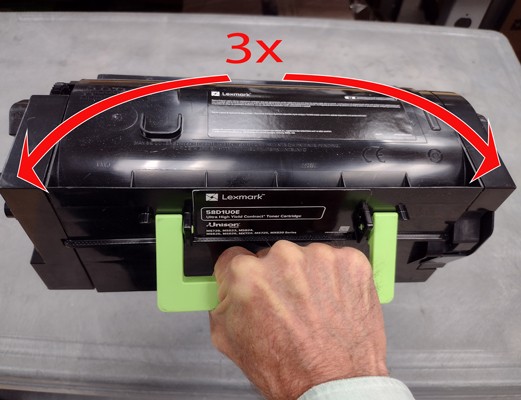
- Take hold of the cartridge by the handle as shown. Raise the cartridge into the air and tip it toward each end several times.
- Check the cartridge and imaging unit for damage in the toner port areas shown. Replace damaged supplies.
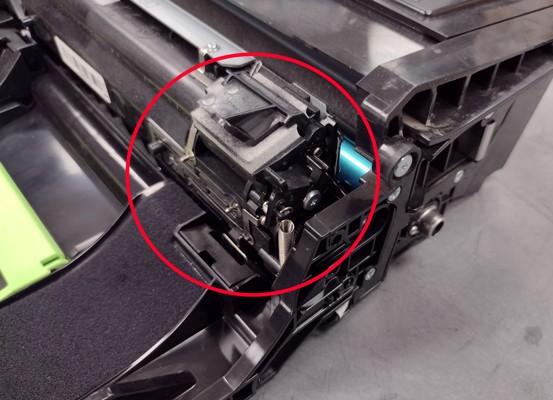
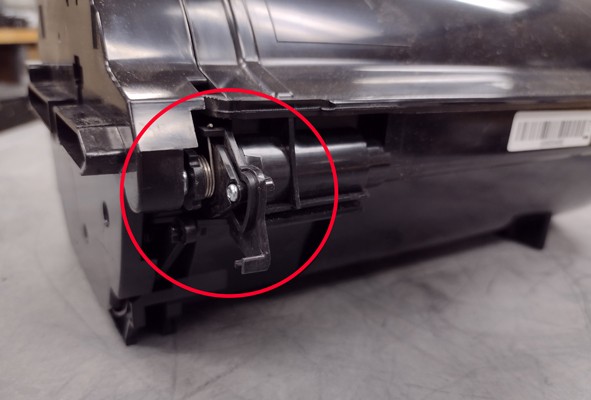
- If no damage is evident, reinstall the supplies and continue printing.
LEGACY ID:
TE929