Using the control panel
Use the features of the control panel to navigate easily through the printer functions and settings.
Lexmark M3346, Lexmark MS531, Lexmark MS631, and Lexmark MS639
Lexmark M3346, Lexmark MS531, Lexmark MS631, and Lexmark MS639
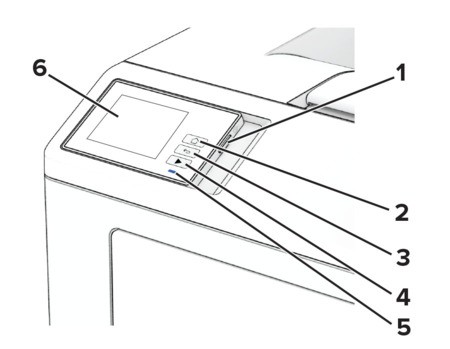
Control panel part | Function | |
|---|---|---|
1 | Power button |
|
2 | Home button | Go to the home screen. |
3 | Back button | Return to the previous screen. |
4 | Start button | Start a job. |
5 | Indicator light | Check the status of the printer. |
6 | Display |
|
Lexmark MS632 and Lexmark M3350
Lexmark MS632 and Lexmark M3350
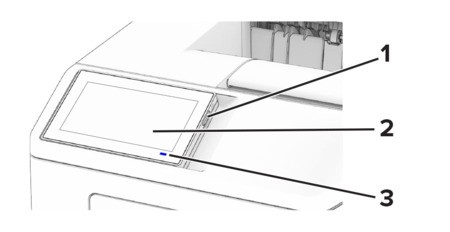
Control panel part | Function | |
|---|---|---|
1 | Power button |
|
2 | Display |
|
3 | Indicator light | Check the status of the printer. |