Repeating defects
Identify the supply item that needs replacement based on the repeating defects that appear on the page.

Before solving the problem, print the quality sample pages to determine the cause of the repeating defects. From the home screen, touch
Settings
>
Troubleshooting
>
Print Quality Test Pages
.- Perform the following tests:
- Make sure to remove all the packing material in the following areas:
- Inside the printer
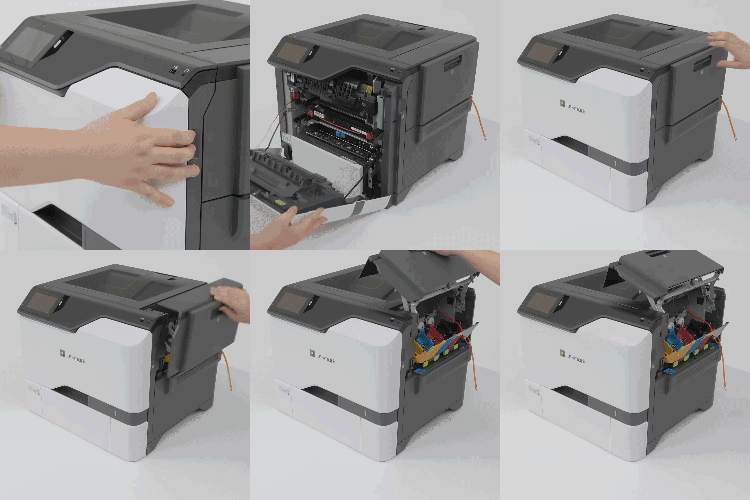
- Toner cartridges and imaging unit
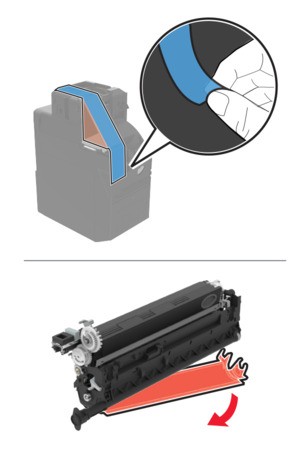
Print the document.Do the defects still appear?- Yes:Go to the next step.
- No:The problem is solved.
- Determine how many colors have defects.Is only one color affected?
- Yes:Go to the next step.
- No:Go to step 3.
Perform the following tests:- Using the Maintenance Defect Ruler, measure the distance between the repeating defects on the affected color page.Replace the supply item that matches the measurement on the affected color page.Color imaging kit or black imaging unit
- 94.5 mm (3.72 in.)
- 29.9 mm (1.18 in.)
- 23.2 mm (0.91 in.)
Developer unit- 43.6 mm (1.72 in.)
- 45.0 mm (1.77 in.)
Print the Print Quality Test Pages.Do the defects still appear?- Yes:Take note of the distance, and then contact customer support or your service representative.
- No:The problem is solved.
Perform the following tests:- Using the Maintenance Defect Ruler, measure the distance between the repeating defects on the affected color page.Replace the supply item that matches the measurement on the affected color page.Transfer module
- 37.7 mm (1.48 in.)
- 78.5 mm (3.09 in.)
- 54.6 mm (2.15 in.)
Fuser- 95 mm (3.74 in.)
- 110 mm (4.33 in.)
Print the Print Quality Test Pages.Do the defects still appear?- Yes:Take note of the distance, and then contact customer support or your service representative.
- No:The problem is solved.