"Authentication Error. Contact System Administrator” error on printers using CAC card readers
Users authenticating using CAC/PIV cards get an intermittent “Authentication Error. Contact System Administrator” message. Authentication Error. Contact System Administrator, CAC, Smart Authentication, 90Meter
Issue Description
Users authenticating using CAC/PIV cards get an intermittent “
Authentication Error. Contact System Administrator
” message. This issue impacts any printer that is configured with CAC/PIV using any of the following newly released licenses:
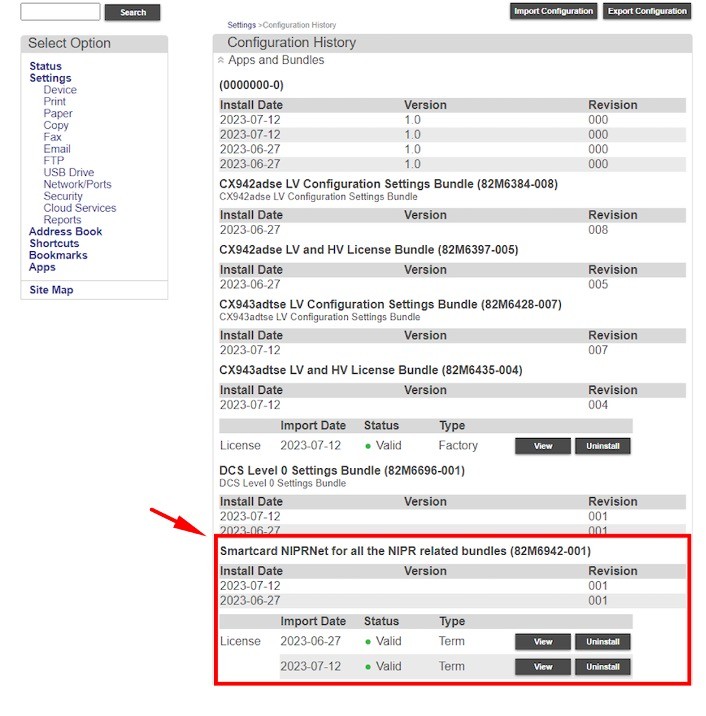
- Smartcard NIPRNet for all the NIPR-related bundles
- Smartcard SIPRNet for all the SIPR-related bundles
Authentication stops working until the printer is restarted. The frequency of failure is intermittent.
Determining whether the printer has a NIPRNet or SIPRNet license
- Open a web browser, and then type the printer IP address in the address field.
- If necessary, log in as an administrator.
- View the printer IP address on the home screen. The IP address appears as four sets of numbers separated by periods, such as 123.123.123.123.
- If you are using a proxy server, then temporarily disable it to load the web page correctly.
- Click .
- Look for theNIPRNet or SIPRNET License.
Solution
- Contact Lexmark Technical Support to get firmware release230.220or later.