Mottled print and dots
Rough paper maybe causing the spots or blotches that you see on your prints. Find out how you can prevent this printing issue from happening again.
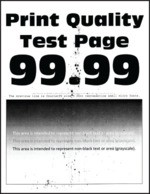
Before solving the problem, print the Print Quality Test Pages. From the home screen, touch
Settings
>
Troubleshooting
>
Print Quality Test Pages
.- Check the printer for leaked toner contamination.Is the printer free of leaked toner?
- Yes:Go to the next step.
- No:Contact customer support.
Perform the following tests:- From the home screen, touchSettings>Paper>Tray Configuration>Paper Size/Type.Check if the paper size and paper type settings match the paper loaded.Make sure that the paper does not have texture or rough finishes.Do the settings match?
- Yes:Go to step 4.
- No:Go to the next step.
- Perform the following tests:
- Depending on your operating system, specify the paper size and paper type from the Printing Preferences or Print dialog.
- Make sure that the settings match the paper loaded in the tray.
- You can also change the settings on the printer control panel. From the home screen, touchSettings>Paper>Tray Configuration>Paper Size/Type.
Print the document.Is the print mottled?- Yes:Go to the next step.
- No:The problem is solved.
- Perform the following tests:
- Load paper from a fresh package.Paper absorbs moisture due to high humidity. Store paper in its original wrapper until you are ready to use it.Print the document.Is the print mottled?
- Yes:Go to the next step.
- No:The problem is solved.
- Perform the following tests:
- Remove the photoconductor units.Do not expose the photoconductor units to direct light. Extended exposure to light may cause print quality problems.Do not touch the photoconductor drums. Doing so may affect the quality of future print jobs.Insert the photoconductor units.Print the document.Is the print mottled?
- Yes:Contact customer support.
- No:The problem is solved.