Using the control panel
Use the features of the control panel to navigate easily through the printer functions and settings.
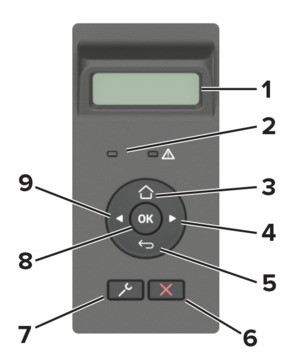
Control panel part | Function | |
|---|---|---|
1 | Display |
|
2 | Indicator light | Check the status of the printer. |
3 | Home button | Go to the home screen. |
4 | Right arrow button |
|
5 | Back button | Return to the previous screen. |
6 | Stop or Cancel button | Stop the current job. |
7 | Menu button | Access the printer menus. |
8 | Select button |
|
9 | Left arrow button |
|