Replacing the transfer belt
Change the transfer belt when the printer starts printing low quality images.
- Turn off the printer.
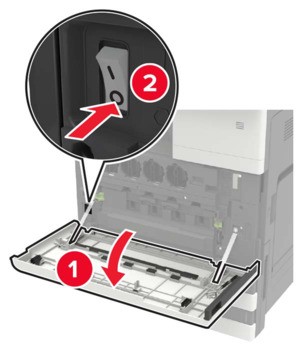 Open door C.
- Make sure that the door does not hit any cable attached to the printer.
- If a 3000‑sheet tray is installed, then slide the tray to the right to open the door.
The inside of the printer might be hot. To reduce the risk of injury from a hot component, allow the surface to cool before touching it. Using the screwdriver stored inside door A, remove the door stopper.
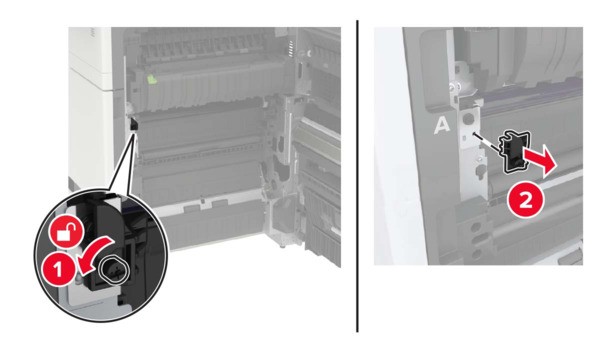 Loosen the screws that secure the transfer belt.
 Remove the paper guide.
 Remove the transfer belt.
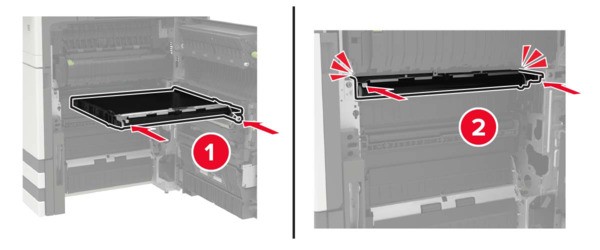
 Unpack the new transfer belt.Do not touch the transfer belt. Doing so may affect the quality of future print jobs.Insert the new transfer belt until itclicksinto place.
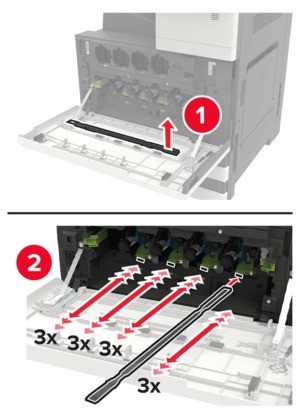
 Using the printhead wiper, clean the printhead lens.
 Insert the paper guide.Secure the transfer belt.Reattach the door stopper.Close the door, and then turn on the printer.