Solid black pages
Check if the imaging unit is properly installed or needs to be replaced to avoid completely black pages on prints.

Before solving the problem, print the Print Quality Test Pages. From the control panel, navigate to  to navigate through the settings.
Settings
>
Troubleshooting
>
Print Quality Test Pages
. For non‑touch‑screen printer models, press to navigate through the settings.- Perform the following tests:
- Check if the printer is using a genuine and supported Lexmark toner cartridge.If the toner cartridge is not supported, then install a supported one.Print the document.Is the printer printing solid black pages?
- Yes:Go to the next step.
- No:The problem is solved.
- Perform the following tests:
- Remove, and then insert the imaging unit.Do not expose the imaging unit to direct light for more than 10 minutes. Extended exposure to light may cause print quality problems.Do not touch the photoconductor drum under the imaging unit. Doing so may affect the quality of future print jobs.Print the document.Is the printer printing solid black pages?
- Yes:Go to the next step.
- No:The problem is solved.
- Perform the following tests:
- Remove the imaging unit.Do not expose the imaging unit to direct light for more than 10 minutes. Extended exposure to light may cause print quality problems.Do not touch the photoconductor drum under the imaging unit. Doing so may affect the quality of future print jobs.Remove any packing material that is stuck on the imaging unit.
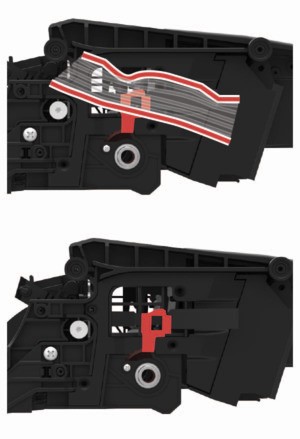 Make sure to remove any obstruction between the charge roller and photoconductor drum.Insert the imaging unit.Print the document.Is the printer printing solid black pages?
- Yes:Go to the next step.
- No:The problem is solved.
Check the imaging unit for signs of damage.Is the imaging unit free from damage?- Yes:Contact customer support.
- No:Go to the next step.
Perform the following tests:- Replace the imaging unit.Print the document.Is the printer printing solid black pages?
- Yes:Contact customer support.
- No:The problem is solved.