Incorrect margins
Are the margins wrong on your printed page? Check the positions of the paper guides in the tray and specify the correct paper size in the computer or the printer.
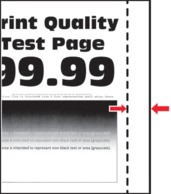
Before solving the problem, print the Print Quality Test Pages. From the control panel, navigate to  to navigate through the settings.
Settings
>
Troubleshooting
>
Print Quality Test Pages
. For non-touch-screen printer models, press to navigate through the settings.- Perform the following tests:
- Adjust the paper guides to the correct position for the paper loaded.Print the document.Are the margins correct?
- Yes:The problem is solved.
- No:Go to the next step.
- Perform the following tests:
- Depending on your operating system, specify the paper size from the Printing Preferences or Print dialog.
- Make sure that the setting matches the paper loaded.
- You can also change the setting from the printer control panel. Navigate toSettings>Paper>Tray Configuration>Paper Size/Type.
Print the document.Are the margins correct?- Yes:The problem is solved.
- No:Contact customer support.