Setting up fax using digital subscriber line
Enable your printer to send faxes through the voice channel of a digital subscriber line.
To avoid the risk of electrical shock, do not set up this product or make any electrical or cabling connections, such as the power cord, fax feature, or telephone, during a lightning storm.
To avoid the risk of electrical shock, do not use the fax feature during a lightning storm.
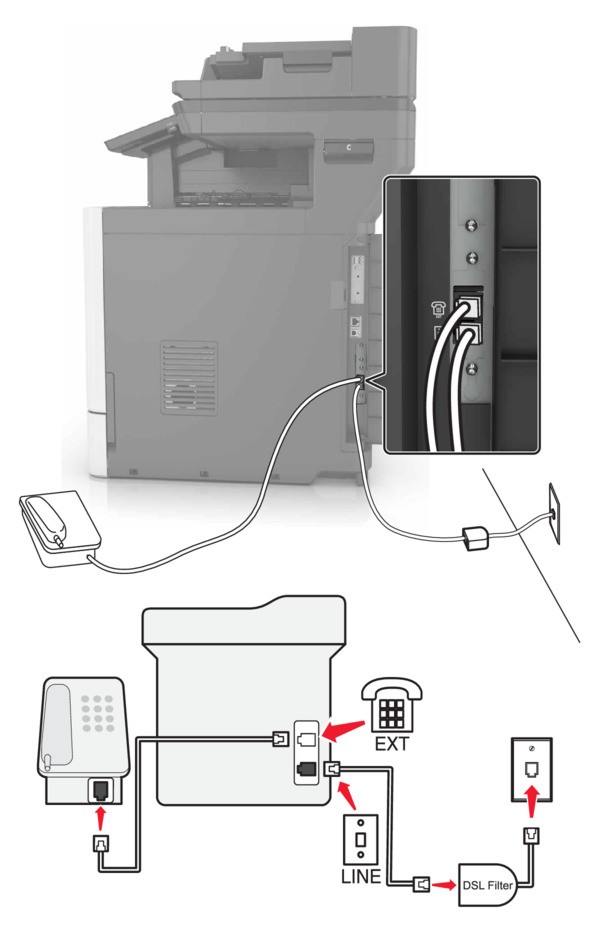
Digital subscriber line (DSL) splits your regular telephone line into two channels: voice and Internet. Telephone and fax signals travel through the voice channel, and internet signals pass through the other channel.
Install a DSL filter to minimize interference between the two channels and ensure a quality connection.
Contact your DSL provider to obtain a DSL filter.
- Connect the line port of the DSL filter to the wall jack.
- Connect one end of the telephone cable to the line port of the printer. Connect the other end to the phone port on the DSL filter.
- To connect a telephone to the printer, remove any installed adapter plug from the telephone port of the printer, and then connect the telephone.