Identifying jam locations
Locate each paper jam correctly for easier tracking and clearing of jams.
- When Jam Assist is set to On, the printer flushes blank pages or pages with partial prints after a jammed page has been cleared. Check your printed output for blank pages.
- When Jam Recovery is set to On or Auto, the printer reprints jammed pages.
Printer jam locations
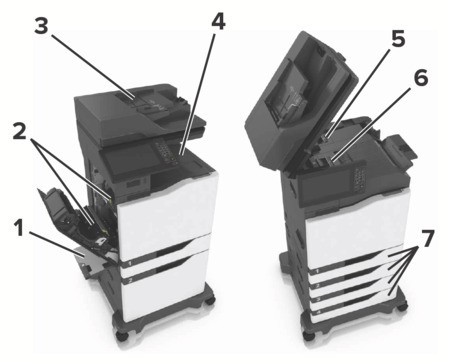
1 | Multipurpose feeder |
2 | Door B |
3 | Automatic document feeder (ADF) |
4 | Standard bin |
5 | Door G |
6 | Finisher bin |
7 | Trays |