Setting up fax using VoIP telephone service
Set up your printer to send faxes through broadband telephone service connection.
To avoid the risk of electrical shock, do not set up this product or make any electrical or cabling connections, such as the power cord, fax feature, or telephone, during a lightning storm.
To avoid the risk of electrical shock, do not use the fax feature during a lightning storm.
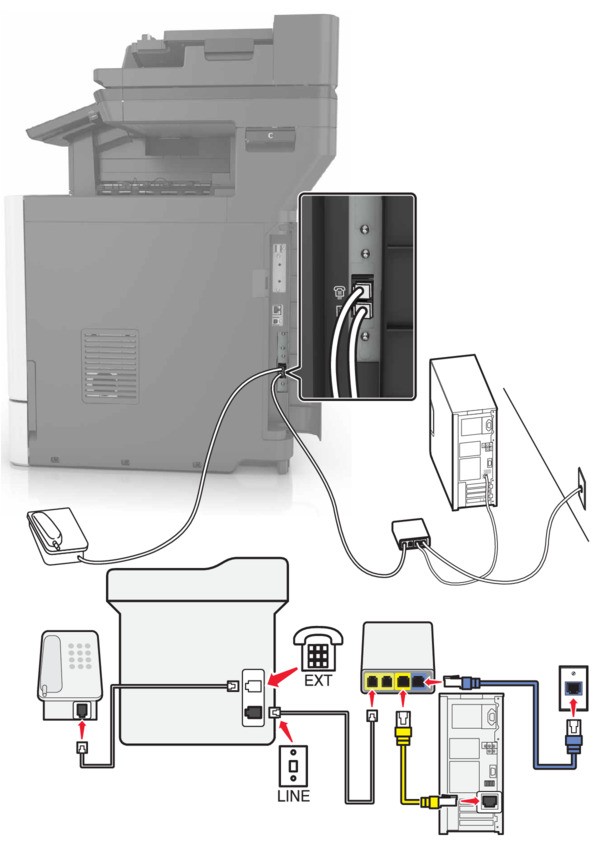
- Connect one end of the telephone cable to the line port of the printer.
- Connect the other end of the cable to the port labeledPhone Line 1orPhone Porton the VoIP adapter.The port labeledPhone Line 2orFax Portis not always active. VoIP providers may charge extra cost for the activation of the second phone port.
- Connect the telephone to the telephone port of the printer.
- To check if the telephone port on the VoIP adapter is active, plug an analog telephone into the port, and then listen for a dial tone.
- If you need two phone ports for your devices, but do not want to pay extra cost, then use a phone splitter. Plug the phone splitter into the port labeledPhone Line 1orPhone Port, and then plug the printer and telephone into the splitter.
- To check the splitter, plug an analog telephone into the splitter, and then listen for a dial tone.