Printer configurations
Make sure to configure the printer on a flat, sturdy, and stable surface.
Basic model
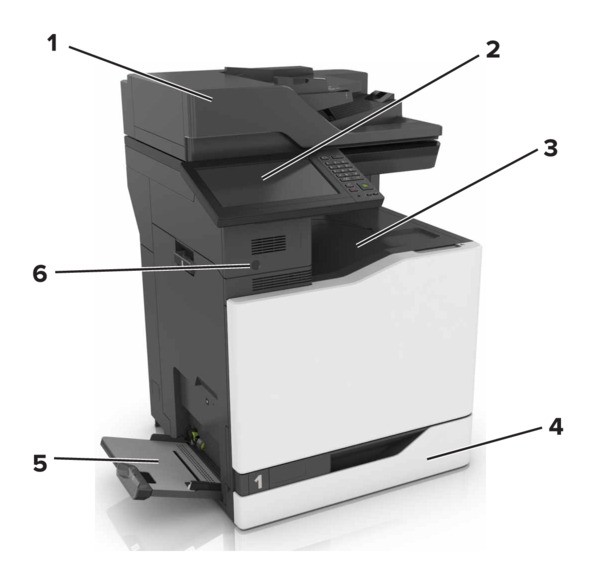
1 | Automatic document feeder (ADF) |
2 | Control panel |
3 | Standard bin |
4 | Standard 550-sheet tray |
5 | Multipurpose feeder |
6 | Proximity sensor This feature is available only in some printer units. |
Configured model
Installing one or more options on your printer or MFP may require a caster base, furniture, or other feature to prevent instability causing possible injury. For more information on supported configurations, see www.lexmark.com/multifunctionprinters.
Installing one or more options on your printer or MFP may require a caster base, furniture, or other feature to prevent instability causing possible injury. For more information on supported configurations, contact the place where you purchased the printer.
You can configure your printer by adding an optional 2200‑sheet tray or a combination of up to three optional 550‑sheet trays or envelope trays.
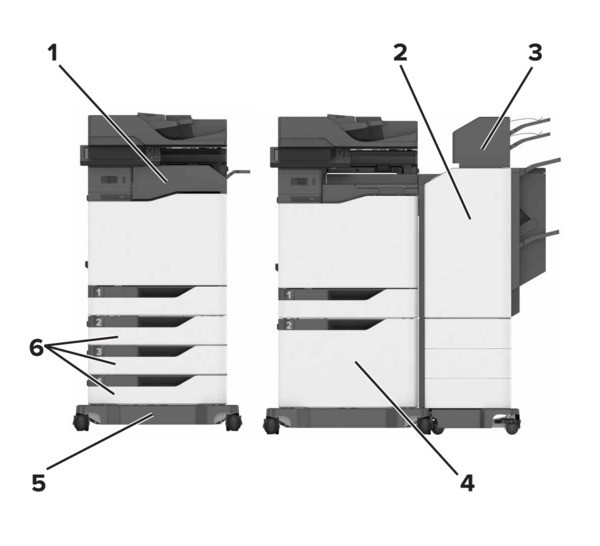
1 | Staple finisher This option is not supported if another finisher is installed. |
2 | Multiposition staple, hole punch finisher This option is not supported if another finisher is installed. |
3 | Mailbox |
4 | Optional 2200‑sheet tray |
5 | Caster base |
6 | Optional 550‑sheet trays or envelope trays |