Using the printer control panel
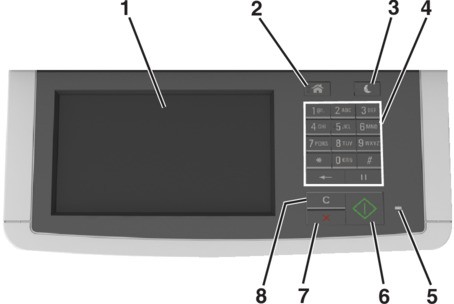
Use the | To | |
|---|---|---|
1 | Display |
|
2 | Home button | Go to the home screen. |
3 | Sleep button | Enable Sleep mode or Hibernate mode. |
4 | Keypad | Enter numbers, letters, or symbols. |
5 | Indicator light | Check the status of the printer. |
6 | Start button | Start a job, depending on which mode is selected. |
7 | Stop or cancel button | Cancel all printer activity. |
8 | Clear all / Reset button | Reset the default settings of a function, such as printing, copying, or e‑mailing. |