Attaching cables
Connect the printer to the computer using a USB or parallel cable, or to the network using an Ethernet cable.
Make sure to match the following:
- The USB symbol on the cable with the USB symbol on the printer
- The appropriate parallel cable with the parallel port
- The appropriate Ethernet cable with the Ethernet port
Do not touch the USB cable, any network adapter, or the printer in the area shown while actively printing. Loss of data or a malfunction can occur.
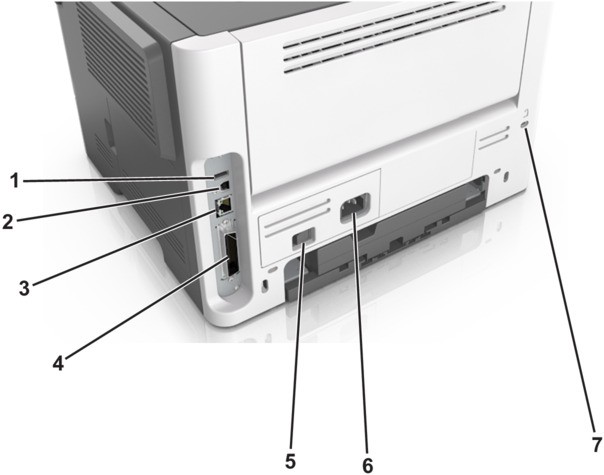
Use the | To | |
|---|---|---|
1 | USB port | Attach an optional wireless network adapter. |
2 | USB printer port | Connect the printer to a computer. |
3 | Ethernet port | Connect the printer to an Ethernet network. |
4 | Parallel port This port is available only in select printer models. | Connect the printer to a computer. |
5 | Power switch | Turn on or turn off the printer. |
6 | Printer power cord socket | Connect the printer to an electrical outlet. |
7 | Security slot | Attach a lock that will secure the printer in place. |