Streaked horizontal lines appear on prints
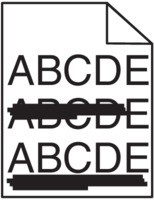
- Perform the following tests:
- Depending on your operating system, specify the tray or feeder from Printing Preferences or the Print dialog.Resend the print job.Do streaked horizontal lines still appear on prints?
- Yes:Go to the next step.
- No:The problem is solved.
- Perform the following tests:From the Paper Menu, set the paper type and weight to match the paper loaded in the tray. To access the Paper Menu, do either of the following:
- If the printer is on a network, then open a Web browser and type the printer IP address in the address field. Then navigate toSettings>Paper Menu.If you do not know the IP address of the printer, then print a network setup page and locate the IP address in the TCP/IP section.
- If the printer is connected to a computer by a USB or parallel cable, then open the Local Printer Settings Utility for Windows or Printer Settings for Macintosh.
Do the paper type and weight settings match the paper in the tray?- Yes:Go to the next step.
- No:Change the paper type and weight to match the paper loaded in the tray.
Perform the following tests:- Load paper from a fresh package.Paper absorbs moisture due to high humidity. Store paper in its original wrapper until you use it.Resend the print job.Do streaked horizontal lines still appear on prints?
- Yes:Go to the next step.
- No:The problem is solved.
- Perform the following tests:
- Reinstall the imaging unit.
- Remove the toner cartridge, and then the imaging unit.Do not expose the imaging unit to direct light for more than 10 minutes. Extended exposure to light may cause print quality problems.
- Install the imaging unit, and then the cartridge.
Resend the print job.Do streaked horizontal lines still appear on prints?- Yes:Go to the next step.
- No:The problem is solved.
- Replace the imaging unit, and then resend the print job.Do streaked horizontal lines still appear on prints?
- Yes:Contact customer support.
- No:The problem is solved.