Printer configurations
Floor-mounted configurations require additional furniture for stability. You must use either a printer stand or printer base if you are using multiple input options. If you purchased a multifunction printer (MFP) that scans, copies, and faxes, then you may need additional furniture. For more information, see www.lexmark.com/multifunctionprinters.
Floor-mounted configurations require additional furniture for stability. You must use either a printer stand or printer base if you are using multiple input options. If you purchased a multifunction printer (MFP) that scans, copies, and faxes, then you may need additional furniture. For more information, contact the place where you purchased the printer.
To reduce the risk of equipment instability, load each tray separately. Keep all other trays closed until needed.
You can configure your printer by adding an optional 250‑ or 550‑sheet tray. For instructions on installing the optional tray, see Installing optional trays.
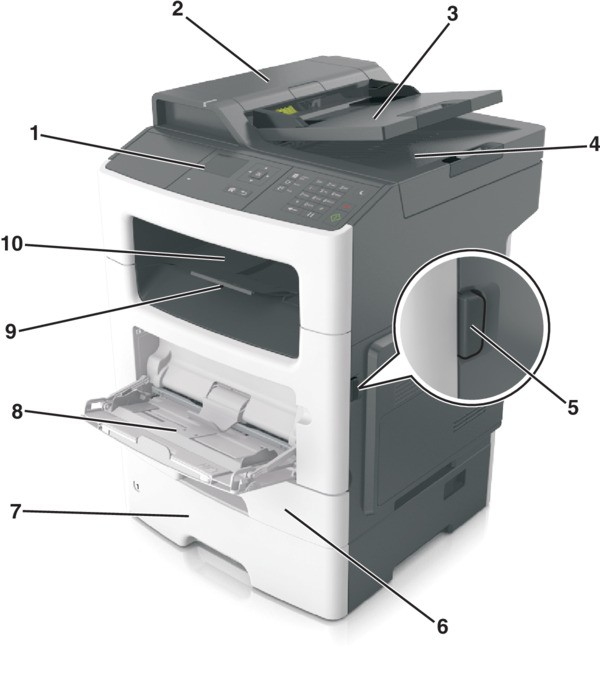
1 | Printer control panel |
2 | Automatic document feeder (ADF) |
3 | ADF tray |
4 | ADF bin |
5 | Front door release button |
6 | Standard 250‑sheet tray |
7 | Optional 250‑ or 550‑sheet tray |
8 | 100‑sheet multipurpose feeder |
9 | Paper stop |
10 | Standard bin |
Some options are supported only in select printer models. For more information, contact the place where you purchased the printer.