Printer configurations
Basic model
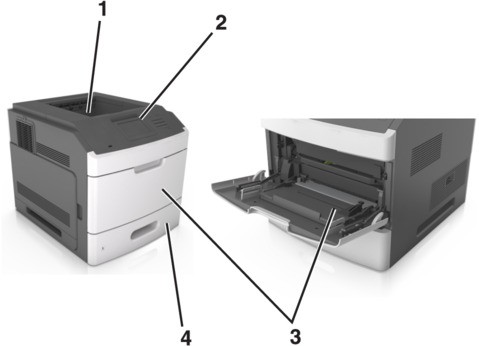
1 | Standard bin |
2 | Printer control panel |
3 | Multipurpose feeder |
4 | Standard 550‑sheet tray (Tray 1) |
Fully configured model
Floor-mounted configurations require additional furniture for stability. You must use either a printer stand or printer base if you are using multiple input options. If you purchased a printer with a similar configuration, then you may need additional furniture. For more information, see www.lexmark.com/multifunctionprinters.
Floor-mounted configurations require additional furniture for stability. You must use either a printer stand or printer base if you are using multiple input options. If you purchased a printer with a similar configuration, then you may need additional furniture. For more information, contact the place where you purchased the printer.
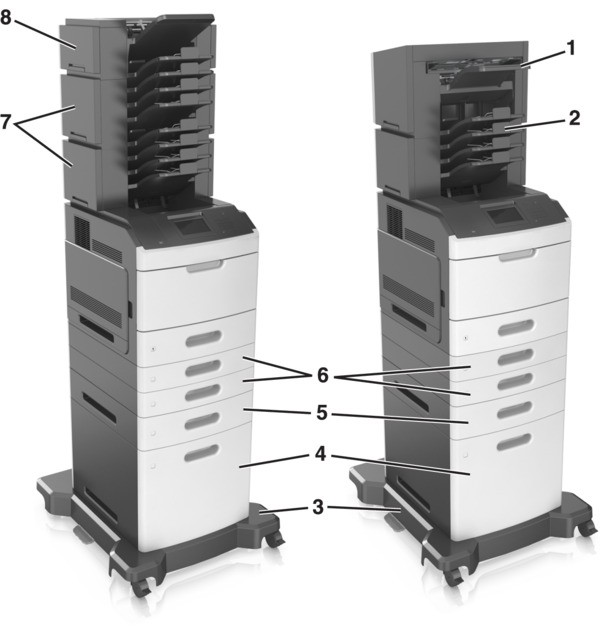
Hardware option | Alternative hardware option | |
|---|---|---|
1 | Staple finisher |
|
2 | 4‑bin mailbox |
|
3 | Caster base | None |
4 | 2100‑sheet tray | None |
5 | 550‑sheet tray | 250‑sheet tray |
6 | 250‑sheet tray | 550‑sheet tray |
7 | 4‑bin mailbox | Output expander |
8 | Output expander | 4‑bin mailbox |
The staple, hole punch finisher must not be combined with any other output options.
- In a configuration with three optional finishers, the output expander and mailbox may be installed in any order.
- In a configuration with two optional finishers:
- The staple finisher must always be on top.
- The high‑capacity output expander must always be at the bottom.
- The output expander is the only option that can be placed on top of the high‑capacity output expander.
- When using optional trays:
- Always use a caster base when the printer is configured with a 2100‑sheet tray.
- The 2100‑sheet tray must always be at the bottom of a configuration.
- A maximum of four optional trays may be configured with the printer.
- The optional 250‑ and 550‑sheet trays may be installed in any order.