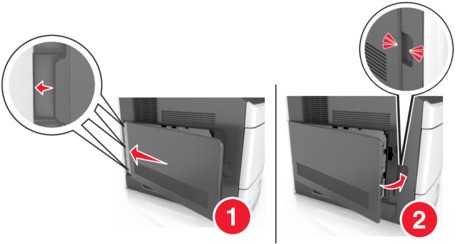
Accessing the controller board
This task requires a flat‑head screwdriver.
If you are accessing the controller board or installing optional hardware or memory devices sometime after setting up the printer, then turn the printer off, and unplug the power cord from the electrical outlet before continuing. If you have any other devices attached to the printer, then turn them off as well, and unplug any cables going into the printer.
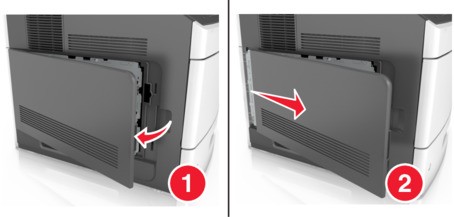
- Remove the controller board access cover.
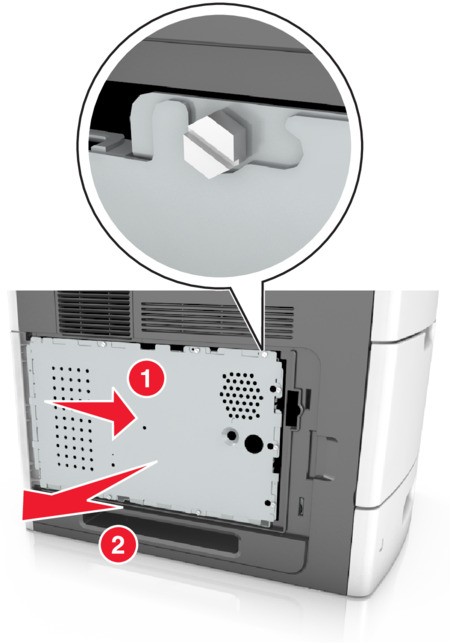
 Using a screwdriver, loosen the screws on the controller board shield.
 Remove the shield.
 Use the following illustration to locate the appropriate connector:Controller board electronic components are easily damaged by static electricity. Touch a metal surface on the printer first before touching any controller board electronic component or connector.
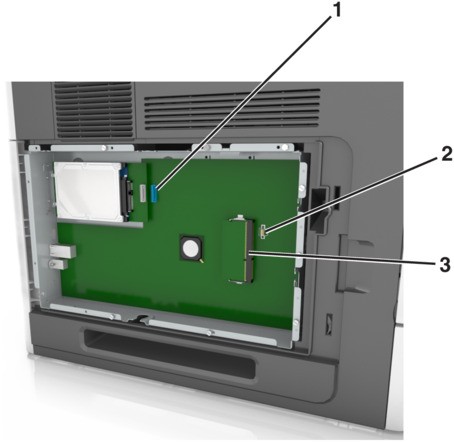 1Lexmark™ Internal Solutions Port or printer hard disk connector2Option card connector3Memory card connectorAlign the screws with the holes on the shield, and then reattach the shield.
 Tighten the screws on the shield.
 Reattach the access cover.