Shadow images appear on prints
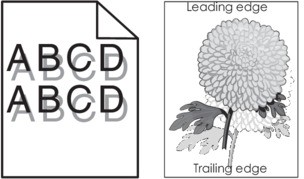
- Check if the paper loaded in the tray has the correct paper type and weight.Is paper with the correct paper type and weight loaded in the tray?
- Yes:Go to the next step.
- No:Load paper with the correct paper type and weight in the tray.
From the printer control panel, set the paper type and weight in the Paper menu to match the paper loaded in the tray.Do the printer settings match the type and weight of the paper loaded?- Yes:Go to the next step.
- No:Change the paper type and weight to match the paper loaded in the tray.
Perform the following tests:- Depending on your operating system, specify the paper type and weight from Printing Preferences or from the Print dialog.Resend the print job.Do shadow images still appear on prints?
- Yes:Go to the next step.
- No:The problem is solved.
- Replace the imaging kit, and then resend the print job.Do shadow images still appear on prints?
- Yes:Contact customer support.
- No:The problem is solved.