Characters have jagged or uneven edges
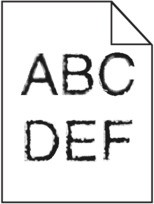
- Perform the following tests:
- Print a font sample list to check if the fonts you are using are supported by the printer.
- From the printer control panel, navigate to:Menus>Reports>Print Fonts
- SelectPCL FontsorPostScript Fonts.
Resend the print job.Are you using fonts that are supported by the printer?- Yes:Go to the next step.
- No:Select a font that is supported by the printer.
- Check if the fonts installed on the computer are supported by the printer.Are the fonts installed on the computer supported by the printer?
- Yes:The problem is solved.
- No:Contact customer support.