Using the printer control panel
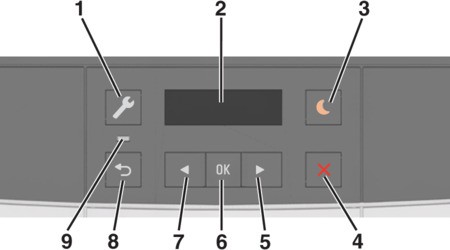
Using the printer control panel

Use the
To
1
Menus button
Open the menus.
  • The menus are available only when the printer is in Ready state.
  • Pressing the button while in a menu item lets you return to the top level menu screen.
2
Display
View printing options as well as status and error messages.
3
Sleep button
Enable Sleep mode or Hibernate mode.
  • Pressing any hard button, sending a print job, or performing a power on reset with the main power switch wakes the printer from Sleep mode.
  • Pressing the Sleep button or performing a power on reset with the main power switch wakes the printer from Hibernate mode.
4
Stop button
Stop printer activity.
5
Right arrow button
  • Scroll through menus or move between screens and menu options.
  • Increase the numeric value of an option or setting being displayed.
6
Select button
  • Select menu options.
  • Save settings.
7
Left arrow button
  • Scroll through menus or move between screens and menu options.
  • Decrease the numeric value of an option or setting being displayed.
8
Back button
Return to the previous screen.
9
Indicator light
Determine the status of the printer.