Home screen icons
Learn how to use the icons on the printer home screen to send files, manage documents, and a lot more.
Your home screen may vary depending on your home screen customization settings, administrative setup, and active embedded solutions.
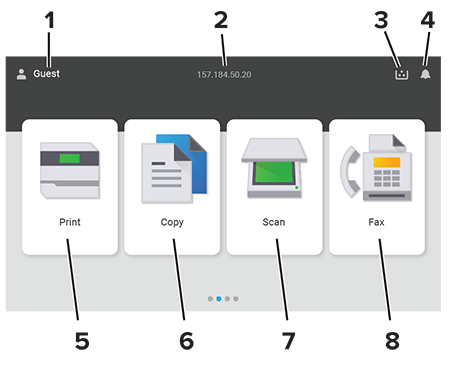
# | Icon name | Function |
|---|---|---|
1 | User | Show if a user is logged in to the printer. |
2 | Displayed information | Show customized printer information such as the printer IP address or the date and time. |
3 | Supply | Show the status of supplies. |
4 | Notification |
|
5 | Print | Print photos and documents. |
6 | Copy | Copy photos and documents. |
7 | Scan | Scan photos and documents. |
8 | Fax | Send fax messages. |