ADF feed error after scanning a document
Automatic Document Feeder (ADF) fails to feed paper after the scanning procedure.
Issue description
The paper stays in the input tray after the scan job and no error code appears.
Possible cause:
This issue occurs if the
bottom pages of a stack sheet are not inserted far enough into the input tray, which does not cover the paper present sensor (A)
.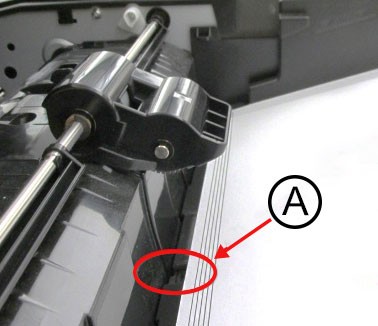
The paper present sensor deactivates when it reaches the sheets of paper stacked in the ADF input tray.
Solution
Ensure the pages are stacked neatly, with all sheets fully inserted within approximately 8 mm of the ADF dam when placed in the input tray.
If the issue persists, then contact customer support.