Setting the date and time in the embedded web server
Set date and time settings on the X64xe Embedded Web Server (EWS)
Issue description
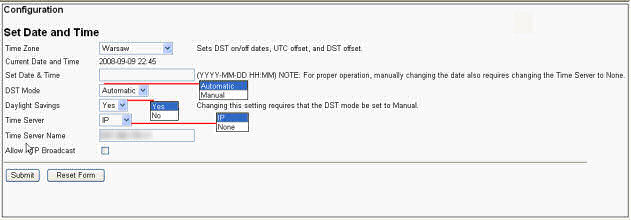
This article provides a brief description of all the configurable settings found under
Configuration > Set Date and Time
. This option can also be found via Menu > Settings
on the MFP user interface.Security permissions set on the device may prevent access to these settings.
Solution
Set date and time settings
Bold
text indicates MFP default settings. EWS Setting | Purpose | Configuration Selections Available |
|---|---|---|
Time Zone | Sets time zone, DST (Daylight Saving Time) offsets, and UTC (Coordinated Universal Time) offsets. | See ' Additional Information and Related Articles ' below. |
Current Date and Time | Displays current time held by RTC (Real-Time Clock) or NTP (Network Time Protocol). | End-user reference only |
Set Date and Time | Manual entry of Year, Month, Day, Hour, and Minutes (YYYY-MM-DD-HH:MM). | Value specified by the end user |
DST Mode | Determines whether or not the MFP will attempt to establish the correct time during time changes. | Automatic or Manual |
Daylight Savings | Determines whether or not the device will attempt to establish proper time change during DST periods. | Yes or NoChanging this value to No requires that DST mode be set to Manual . |
Time Server | If NTP (Network Time Protocol) is used on the network, this setting may be set to IP. This may be needed or desired for consistent synchronization of time and date. | None or IP. |
Time Server Name | Name or IP address of the time server. | Host name or IP address of the NTP server. |
Allow NTP Broadcast | Allows the MFP to broadcast SNMP beacons in an attempt to locate the NTP server. | Off or On. |
Additional information
- Click here for an overview of the same configuration settings in the MFP Menus Guide.
LEGACY ID:
SO4550