How to locate
the serial number, machine type, and config ID
How to Locate the Serial Number, Machine Type, and Config ID on a Lexmark X642, X644, or X646 Printer
Overview
When calling for warranty service, you will need to know your
printer's
machine (model) type
and serial number
. This information
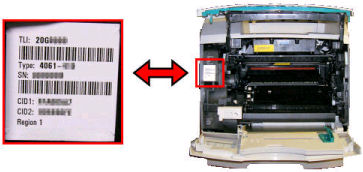
can be found on a label on the inside of the printer (see the instructions
below). The label also shows the printer's part number (TLI
) and config ID number (CID
). NOTE:
The printer serial number
is also listed on the menu settings pages you can print from the printer
operator panel.Locating the Printer's Serial Number
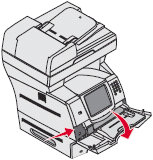
- Push the release latch on the left and open the lower front cover (multipurpose feeder).
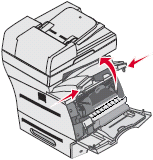
- Push in the side release latches and open the top front cover.
- Look for the serial number sticker on the left-hand side of the printer.
Still Need Help?
If you need additional assistance, please contact Lexmark Technical Support.
LEGACY ID:
HO3129