Clearing a '29x Scanner Jam' message
Here are steps to clear a '29x Scanner Jam' message on the Lexmark X642e, X644e or X646e multifunction printer.
Issue description
The
29x Scanner Jam
messages indicates that a piece of paper has been detected in the MFP's scanner path and needs to be removed.To reduce the risk of injury from a hot component, allow the surface to cool before touching it.
Solution
- Remove all documents from the Automatic Document Feeder (ADF).
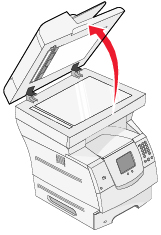
- Open the ADF cover, and remove any jammed media.When removing a jammed sheet of paper from the ADF scanner, always open the ADF cover,thencarefully ;remove any jammed pages. If the page does not ;come out easily, use the green wheel to advance the page, or lift the flatbed scanner cover and try to access the page from the bottom.
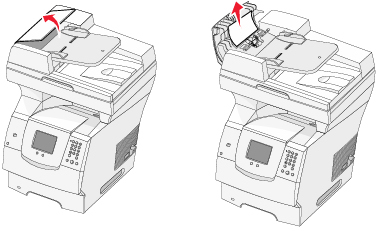
- Open the document cover, and remove any jammed media.
- Open the scan unit access door, and remove any jammed media.
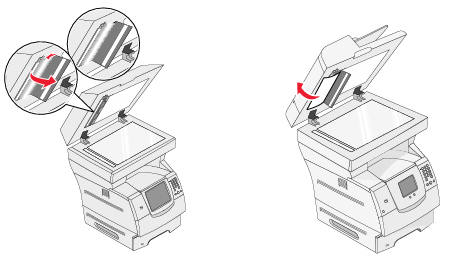
- Close the scan unit access door and ADF cover.
- TouchContinue.
If the issue continues
If
29x Scanner Jam
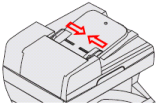
messages continue to occur, check the following:- Confirm that the paper guides on the ADF are in the proper position to support the paper stack.
- Position the guides on the ADF tray to match the size of paper you plan to load into the ADF.There are paper-size indicators stamped into the plastic on the ADF tray. Use these indicators to help position the paper-size guides.
- Load the paper into the ADF tray.
- Position the paper guides so that they lightly touch the sides of the paper, thus not allowing pages to shift when fed.
- Examine the paper loaded into the ADF. Confirm that the paper is not damaged, creased or wrinkled, and remove any pages.
- If you are loading more than one sheet of paper at a time into the ADF, remove the pages and ;fan them on all sides to help separate the sheets. Also, confirm that the pages are not stapled or paper-clipped together.
- If the error displayed is a '290' type paper jam message (290.01,290.02, etc.), the main pick roller may be misaligned. Reseating the pick arm assembly should correct this issue. For detailed directions on how to do this, repeated-290-paper-jam-messages-occur-when-using-t.html#repeated-290-paper-jam-messages-occur-when-using-the-automatic_SO4685.
LEGACY ID:
SO4322