A '900.80 Service RIP Software' Error Is Appearing on a Lexmark X642e, X644e, or X646e Printer
What you will see
The printer displays a
900.80
Service RIP Software
error. What This Error Means
A
900.80 Service RIP Software
error indicates a problem with the current print job or with a part within the scanner unit of the printer.Recommended actions
Step
| Action
|
1
| Power off the printer. Leave it powered off for ten seconds or more to clear its memory. |
2
| While the printer is off, clear any pending print jobs from the computer or the network queue. This will prevent any possibly corrupted print jobs from being re-sent to the printer and causing the error when it is powered back on. |
3
| Power on the printer again.
|
4
| Power off the printer once more. |
5
| Open the upper ADF unit by pressing the green latch. 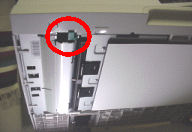 |
6
| Check the sensor flag highlighted in the picture below. Make sure the flag moves freely. 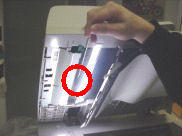
|
Still need help?
Please contact Lexmark Technical Support if you need additional assistance.
NOTE:
When calling for support, you will be asked for your machine/model type
and serial number
(SN). If you need help locating these, how-to-locatethe-serial-number-machine-type-and-co.html#how-to-locatethe-serial-number-machine-type-and-config-id_HO3129.Please call from near the printer in case the technician on the phone asks you to perform a task involving the printer.
LEGACY ID:
SO4122
- Infoprint 1570 MFP ----------------------------------------------------------------------------- Infoprint 1650 MFP