E-mail Alerts Fail to Work with an SMTP Authenticated E-mail Server
What you will see
Alerts do not work after configuring
E-mail Alert Setup
.Affected Products
- X64xSeries MFPs
- X85x
- X78x
- X94x
An
x
denotes any number within a given product model series.Suggested Remedy
Purchase one of Lexmark's latest MFPs, or
contact
Lexmark Technical Support to inquire about a possible special product request.Explanation
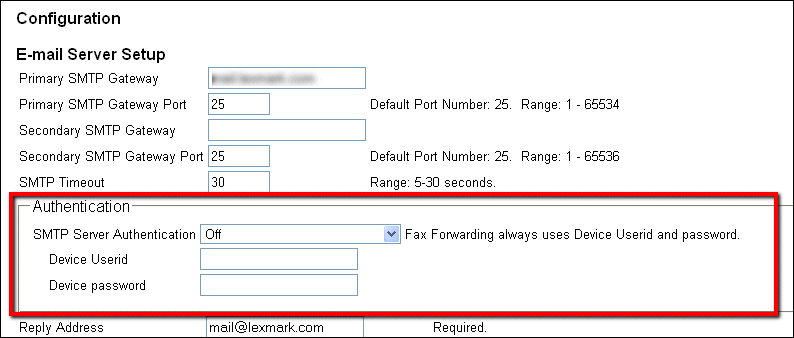
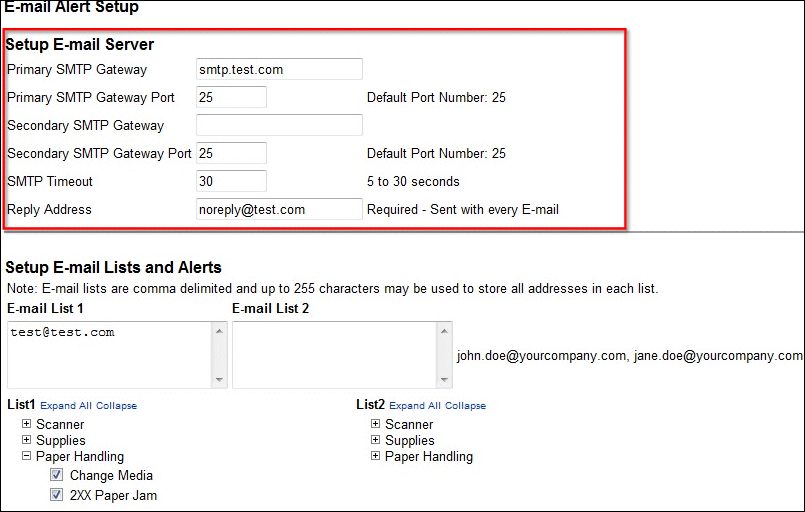
The absence of configurable SMTP authentication settings for E-mail Alerts prevents the use of this feature.
Because these settings are independent from those of the MFP's primary e-mail server setup, the E-mail Alert function cannot be used with any e-mail server that requires authentication.
E-mail Server Setup
| E-mail Alert Server Setup
|
 |  |
Click the images above to enlarge them.
Still Need Help?
If you require additional assistance, please see
Contact
information.
NOTE:
When calling for support, you will need your printer model/machine type
and serial number
(SN
).
Please be near the products described in this article to expedite the support process and reduce call-back situations.
LEGACY ID:
SO6832