How to set up the Fax Logs on Multifunction products
How to Set Up the Fax Logs on the Multifunction Printer
Purpose
This article tells you how to set up the fax logs on the Multifunction Products (MFP). The function of each log setting is also explained.
How to Configure the Log Settings
Using the web browser:
Step | Action |
|---|---|
1 | Go to the web browser of the MFP. Refer to Viewing or printing fax logs on a multifunction printer for instructions. |
2 | Click on Configuration .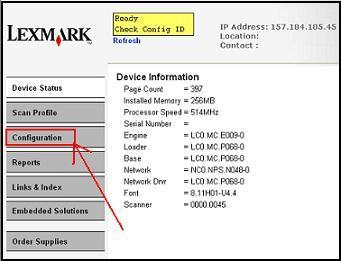 |
3 | Click on Fax Settings .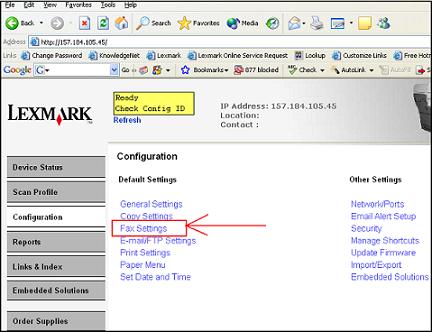 |
4 | Click on Analog Fax Setup .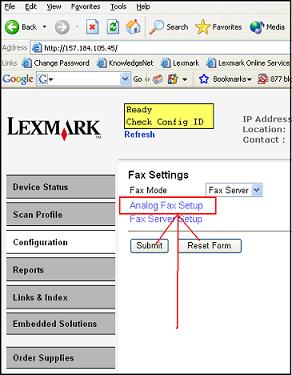 |
5 | Go to Fax Log Settings .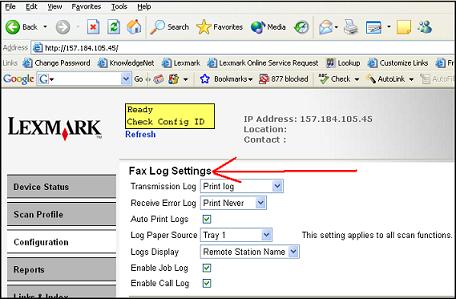 |
6 | Go to the Log Explanation section to understand which logs you need to set. |
Explanation of Log Types
There are different types of logs available for review from the fax portion of your MFP.
Log | Description |
|---|---|
Transmission Log | The transmission log will print the transmission information with a thumbnail image of the first page of the fax being sent. |
Receive Error Log | The receive error log will print only if an error occurs when the MFP is receiving a fax. |
Job Log | This log maintains information about each job such as the time/number of pages scanned, the time of each try if there are retries, and the number of pages sent on each try, among other things. |
Call Log | Log of calls received. |
Viewing or Printing Logs
If you would like to view or print the fax logs, refer to Viewing or printing fax logs on a multifunction printer for more information.
LEGACY ID:
HO3009