How to disable USB Flash Drive functionality
How to Disable USB Flash Drive Functionality
Issue description
Purpose
This article explains how to disable the USB flash function on a Multifunction Printer (MFP).
Explanation
You might want to disable this function if you are using tracking software to capture print information going across the network.
Instructions for disabling the flash drive access
There are two ways to disable the flash drive access on the MFP. Both methods are described below.
Using the touchscreen
Step | Action |
|---|---|
1 | Press the Menu button. 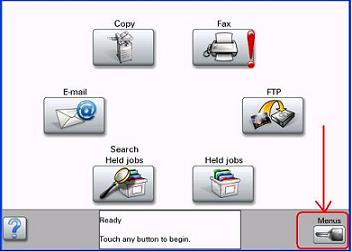 |
2 | Press the right arrow key key next to Settings .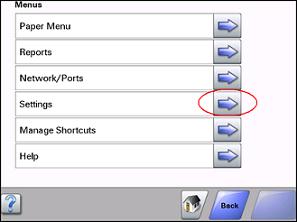 |
3 | Press the down arrow button. |
4 | Press the right arrow key next to Security .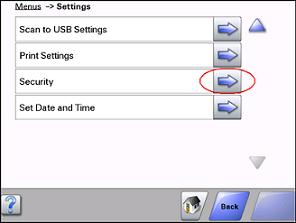 |
5 | Press next to Function Access . |
6 | Press the down arrow button. |
7 | Change the Flash Drive Scan and Flash Drive Print access to the desired authentication level using the left arrow button and the right arrow button.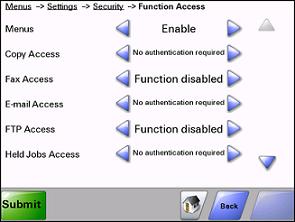 |
8 | Press the Submit button. |
Using the Web browser
Step | Action |
|---|---|
1 | Access the printer's Web browser. |
2 | Click on Configuration . 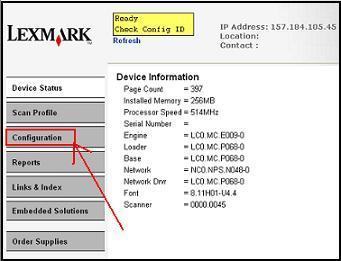 |
3 | Click on Security .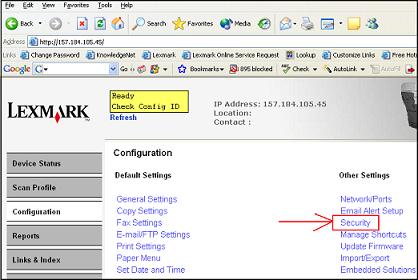 |
4 | Click on Function Access . |
5 | Change the Flash Drive Scan and Flash Drive Print access to the desired authentication level.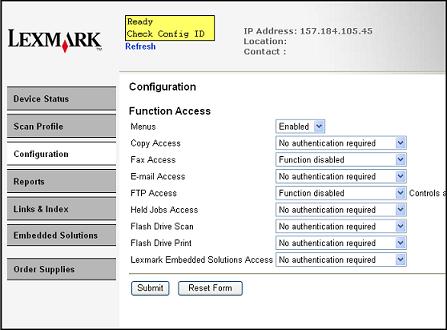 |
6 | Click Submit . |
LEGACY ID:
HO3094