298.01 or 298.02 Scanner Missing message
298.01 or 298.02 Scanner Missing Message on the Lexmark X782e Color MFP or X646ef Laser MFP
Issue description
A
298.01 or 298.02 Scanner Missing
error is generally caused by one of the scanner cables being loose or unplugged.Solution
Step | Action |
|---|---|
1 | Power off the MFP. |
2 | Check the two cable connections on the rear of the ADF unit ( red
1 Bottom ADF Cable orred 2 Top ADF cable in right-hand image). Unplug and replug both cables in order to ensure that the connectors are seated fully before proceeding to tighten the two screws completely.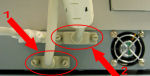 A flat-head screwdriver or a coin are ideal implements for tightening the screws completely. |
3 | Power on the MFP again.Did the error return?
|
LEGACY ID:
SO4821